
On this page
Start your online academy today. 7 days free.
Start free trialTo get a domain name for your coaching institute, shortlist a few short names that are easy to say, check them for hyphens, numbers and trademarks, buy the best one in your own name from any registrar, switch on privacy and auto-renew, then add the DNS records your academy platform shows you. A typical .in or .com costs about ₹600–1,200 a year. Most of the work is choosing the name; the technical part is a few copied records.
Maybe you run a NEET biology batch in Patna and students know you as "Sharma Sir", or you teach spoken English to working adults over Zoom. Your course link today is a long platform address or a WhatsApp forward. A name like sharmabiology.in is something a parent can hear once on a phone call and type correctly.
This guide covers the practical side: choosing the name, choosing the ending, buying it safely, keeping it renewed, understanding A, CNAME and TXT records, and connecting it to your academy. If you are still deciding whether your academy should live on its own domain at all, read why an LMS with a custom domain matters first, then come back here.
Key takeaways
- A good coaching domain is short, easy to say once, and has no hyphens, numbers or exam year in it. Your name or your academy's name usually beats a long keyword phrase.
- .in is a good default for an academy that teaches students in India; .com suits academies that also teach abroad, and .co.in or .academy work when your first choice is taken.
- Buy the domain in your own name, with your own email, from any registrar (GoDaddy, Namecheap, Hostinger, BigRock or another). A typical .in or .com costs about ₹600–1,200 a year.
- Turn on privacy protection, auto-renew and two-step login the day you buy. An expired domain takes your website and every shared link down with it.
- Connecting takes a few DNS records: a TXT record proves the domain is yours, and a CNAME or A record points it at your academy. It usually works within a few hours; DNS can take up to 24–48 hours.
- On AllCoaching, connecting your own domain is free on every plan, HTTPS is switched on for you, and your free handle.allcoaching.in address keeps working after you connect.
How to get a domain name for your coaching institute: 7 steps
Shortlist names, check availability, buy in your own name, protect the account, start the connection in your studio, add the DNS records at your registrar, and wait for it to go live. Each step is explained in detail below.
- Shortlist three to five namesBuild names from your own name, your academy's name or your subject, then test each one: short, easy to say once, no hyphens or numbers, no exam year, free as a social handle, not someone else's trademark.
- Check availability and pick the endingSearch your shortlist at a registrar. Choose .in for an academy teaching students in India or .com if you also teach abroad; use .co.in or .academy only when your first choice is taken.
- Buy the domain in your own nameRegister it at any registrar, such as GoDaddy, Namecheap, Hostinger or BigRock, with your own name, email and payment method. Skip hosting, website-builder and SSL add-ons.
- Protect the registrar accountTurn on privacy protection, auto-renew and two-step login, keep the transfer lock on, and note the expiry date in your calendar.
- Start the connection in your studioIn the AllCoaching studio, open Own branding, then Domain, choose Connect a domain and type the domain exactly as you bought it.
- Add the DNS records at your registrarOpen the registrar's DNS page and paste each record the studio shows, usually a TXT record and a CNAME or A record. Leave existing email (MX) records untouched.
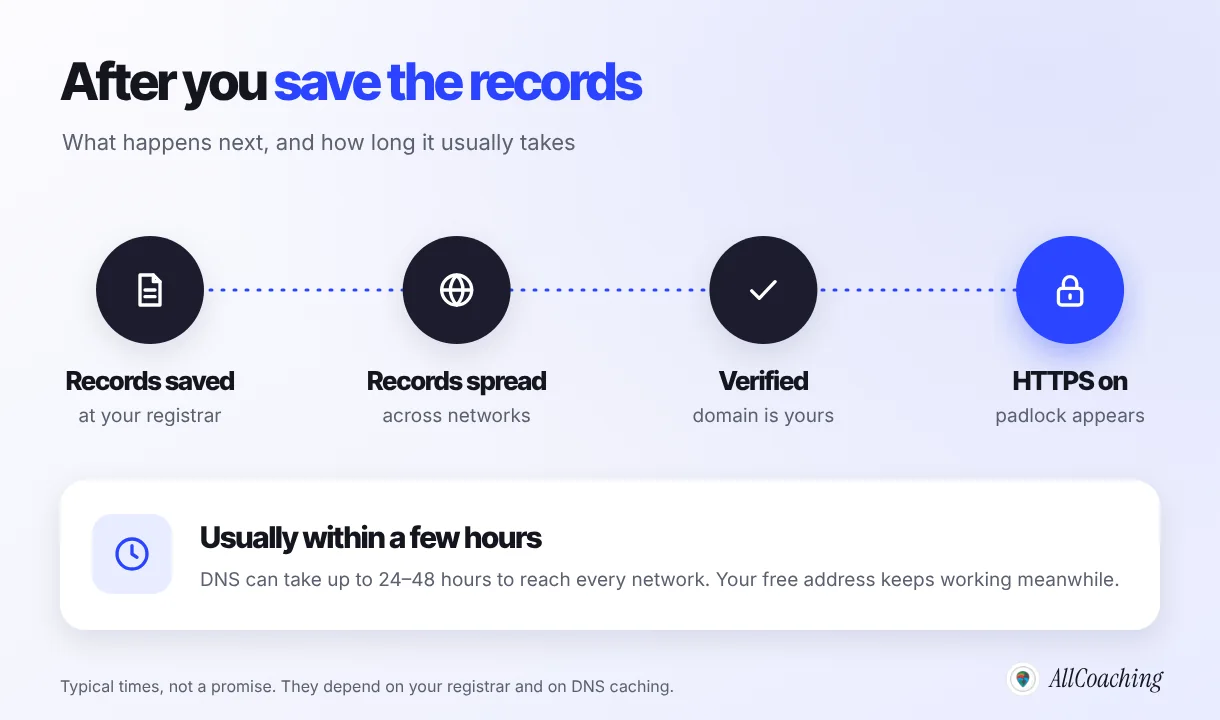
- Wait for Connected, then share itVerification and HTTPS usually complete within a few hours, and DNS can take up to 24–48 hours. Then update your YouTube, Instagram and WhatsApp links to the new address.
The order matters. Educators who buy first and think later often end up with a name they outgrow in a year, or a domain sitting in an agency's account. When we help educators connect domains, most problems come from two places: the registrar login belongs to someone else, or a DNS record was typed by hand instead of copied. Both are easy to avoid from the start.
What is a domain name, and does a coaching institute need one?
A domain name is your academy's address on the internet, such as sharmabiology.in, which you rent yearly from a registrar and point at your website. Students type it, search engines index it, and every link you share carries it. It belongs to whoever is named as its registrant, so register it yourself.
You do not need a domain on day one. Every AllCoaching academy gets a free address of the form yourname.allcoaching.in the moment it is created, and you can sell from it straight away. Your own domain becomes worth it once you share your link widely, on YouTube, Instagram, posters and WhatsApp. A short name of your own is easier to remember and trust, and it stays yours if you change platforms.
Real academies show the pattern. Dr. Subhash Nair's Biology Lessons runs at biolessons.in, CHEMPSI by Anupam Kumar at chempsi.com, and DigiteKM at digitekm.com. Each name is short, says the subject or the brand, and has no hyphens or numbers. The rest of your brand matters too; our guide to building a personal brand as an educator covers the name, face and voice behind the domain.
How to choose a domain name for your coaching institute
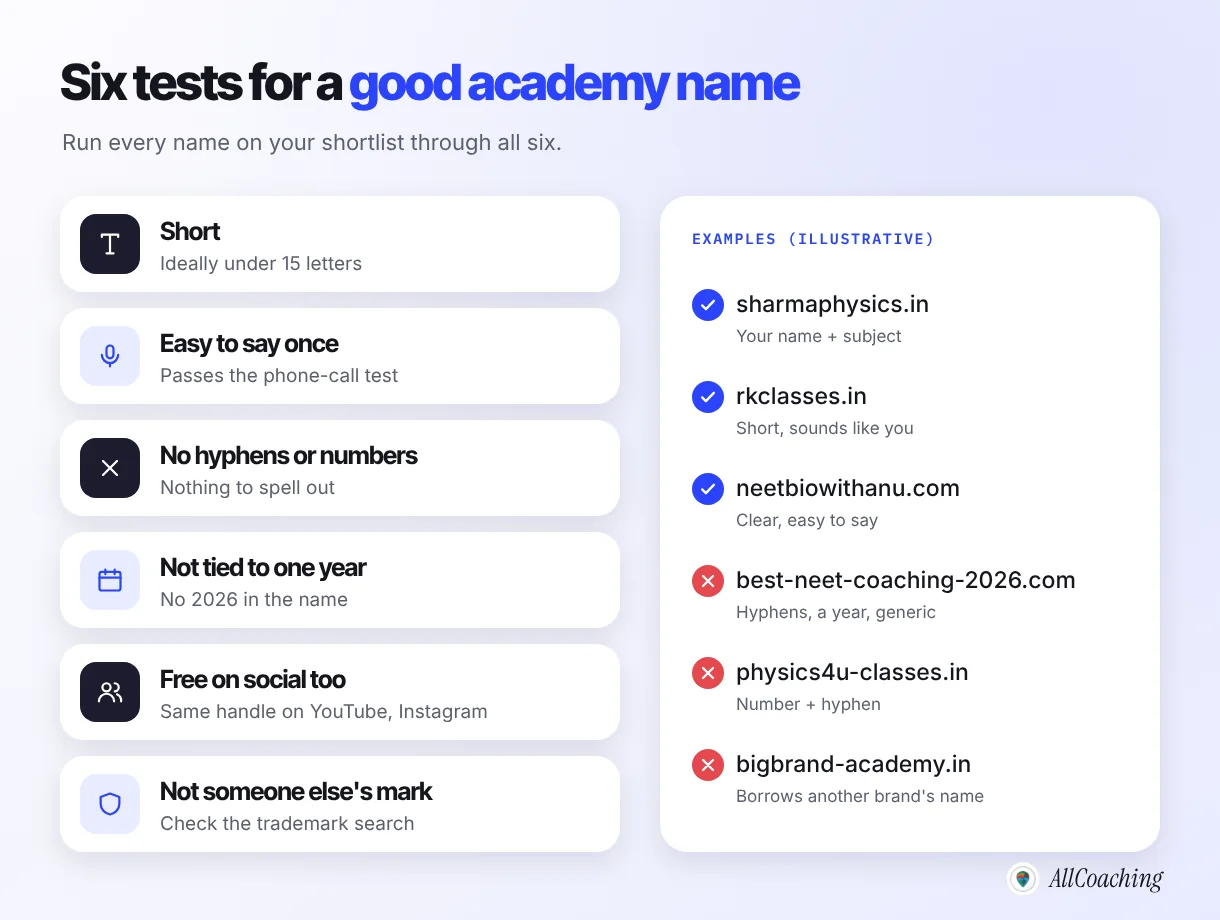
Choose a name that is short, easy to say once, free of hyphens and numbers, not tied to one exam year, available as a social handle, and not someone else's trademark. Write three to five candidates, then test each one against those six rules.
Start from your name, your academy or your subject
Most good coaching domains come from your own name (anitamaam.in), best when students already follow you; your academy's name (rkclasses.in), best when you have a team; or your subject plus a short word (neetbiohub.in), best when the topic should be obvious. Mixing two is fine if the result stays short.
Pass the phone-call test
Say the name to someone over the phone and ask them to type it. If they ask "with a hyphen?" or "the number 4 or the word?", pick another name. Hindi and regional words in Roman script are fine; choose the spelling most people would guess.
Do not lock it to one exam or year
A name like ssccgl2026.in is out of date in a year, and a name tied to one exam is awkward when you add banking or state PSC batches. Keep exam names for course page addresses, such as youracademy.in/ssc-cgl-maths, and keep the domain itself broader.
Check social handles and trademarks
Before you buy, check that the same name is free on YouTube and Instagram. Then search the name in the IP India public trademark search. If a well-known coaching brand already owns that name, a lookalike domain invites a legal notice and confuses students. When in doubt, ask a trademark lawyer before you print anything.
Question educators ask
Should I put my city or exam in the domain name?
Only if you will never outgrow it. A city in the name, such as a Kota or Patna reference, helps a local centre with walk-in students, but it can feel narrow once you teach online across India. An exam name helps search today but limits you later. A short brand name plus clear course page addresses gives you both.
.in, .com, .co.in or .academy: which ending should you choose?
For an academy that teaches students in India, .in is a good default; choose .com if you also teach students abroad, and use .co.in or .academy only when your first choice is taken. The ending, called a top-level domain or TLD, matters less than the name in front of it.
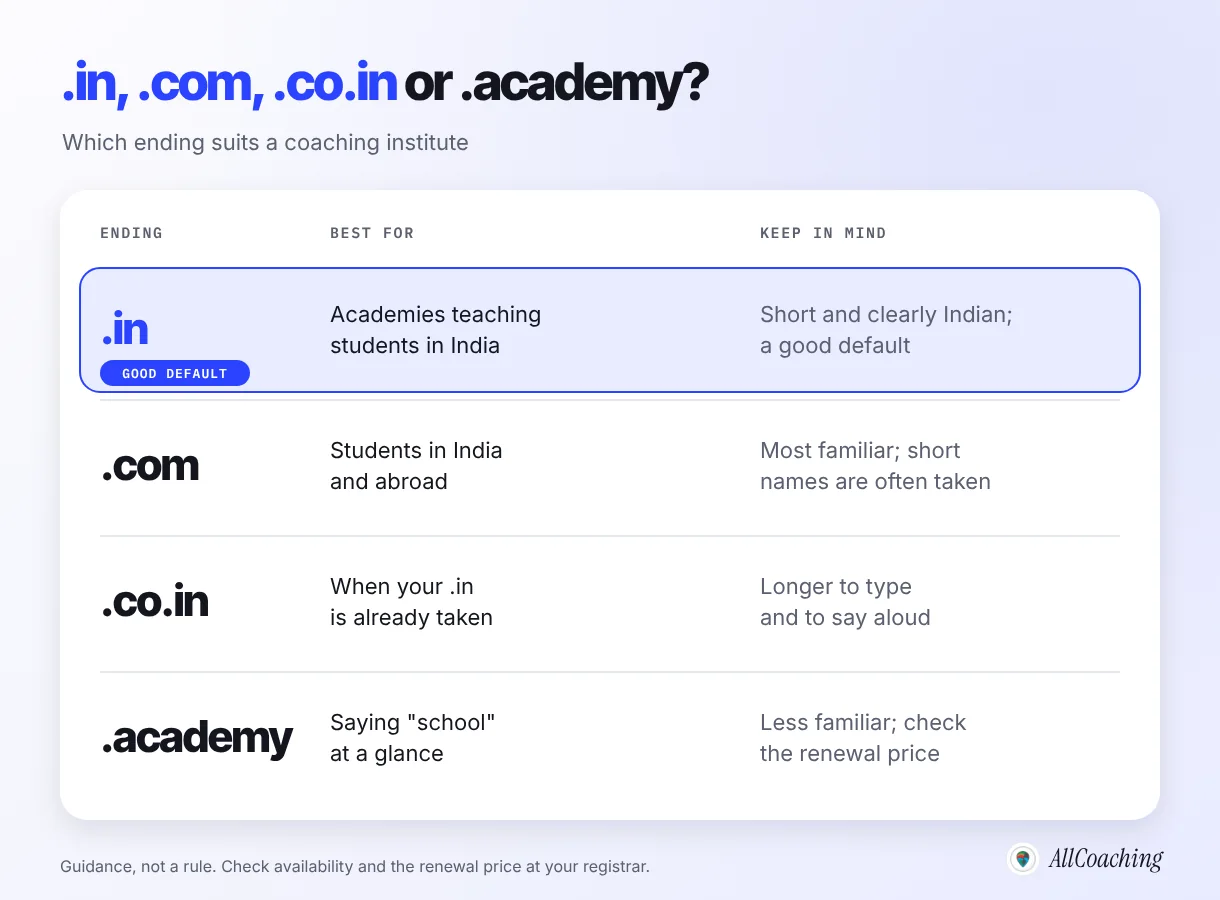
- .in is India's country-code domain, run by the .IN Registry under NIXI.3 It is short, clearly Indian, and many good names are still available.
- .com is the most familiar ending worldwide. It makes sense if you teach NRI students, run a skill course with buyers abroad, or simply find your exact name free.
- .co.in is a second-level option under .in. It works, but it is longer to type and say aloud.
- .academy is one of the newer generic endings. It says "school" at a glance, but some students will not recognise it as a web address. Check the renewal price before you buy.
If both the .in and the .com of your name are free, buying both protects the brand; point the second at the first.
Where to buy a domain name in India, and what it costs
Buy your domain from any domain registrar, such as GoDaddy, Namecheap, Hostinger or BigRock; a typical .in or .com costs about ₹600–1,200 a year. The registrar matters less than buying it in your own name and checking the renewal price, not only the first-year offer.
For .com, .academy and other generic endings, domains are sold by registrars accredited by ICANN, the body that coordinates the domain system, or by their resellers. ICANN notes there are more than two thousand accredited registrars.1 For .in, registrars are accredited by the .IN Registry. Most well-known Indian and global registrars sell both.
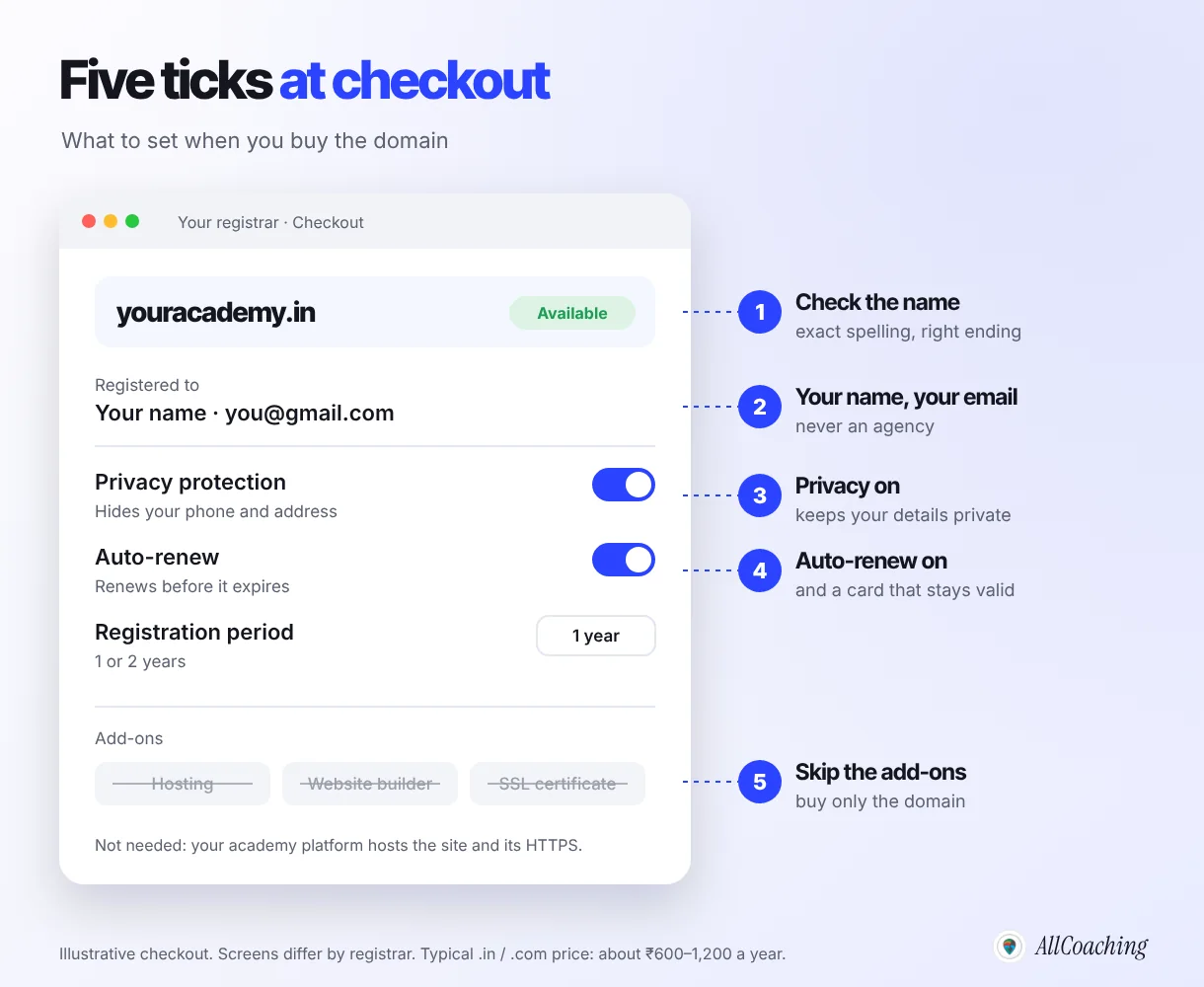
What to set at checkout
- Your name and your email. The registrant is the legal holder, so never use an agency's or a staff member's details.
- Privacy protection on, if your registrar offers it for that ending.
- Auto-renew on, with a card or UPI mandate that will not expire soon.
- Skip the add-ons. An academy platform already hosts your site and handles HTTPS, so you do not need the registrar's hosting, website builder or SSL certificate.
What a domain actually costs
| Item | Typical cost | Note |
|---|---|---|
| Domain registration (.in or .com) | About ₹600–1,200 a year | Typical range; first-year offers and renewal prices differ by registrar |
| Privacy protection | Varies | Included by some registrars; check at checkout |
| HTTPS certificate | Included on AllCoaching | Switched on for your connected domain |
| Connecting the domain to your academy | Included on AllCoaching | Free on every plan |
| Email on your domain | Optional | Priced by the email provider you choose |
Domain privacy, WHOIS and renewal: how to protect your domain
Protect your domain with three settings: privacy protection so your phone and address are not public, auto-renew so it never lapses, and two-step login so nobody else can take over the registrar account. Losing a domain is far harder to fix than buying one.
WHOIS and privacy
Every domain has registration data, traditionally called WHOIS, that anyone can look up, for example through ICANN Lookup. Many registrars now hide personal details by default or offer privacy protection, which shows the registrar's contact details in place of yours. Look up your own domain after buying it to see what is visible. Keep the details you give the registrar accurate even when they are hidden, because that is how ownership is proven if there is ever a dispute.
Renewal and auto-renew
A domain is rented, not bought outright. If it expires, your academy website, your course links and any email on the domain stop working, and after a grace period someone else can register it. For .com, .academy and other generic endings, ICANN's Expired Registration Recovery Policy requires registrars to send at least two expiry reminders, roughly one month and one week before the date.2 Those emails go to the registrant's address, which is one more reason to use your own.
- Turn on auto-renew and keep a valid payment method on file.
- Put the expiry date in your phone calendar a month ahead.
- Turn on two-step login for the registrar account and keep the transfer lock on.
- If someone else set up your domain, move it to an account in your name now.
DNS basics: A record, CNAME and TXT in plain words
DNS is the internet's address book: it turns your domain into the location of your website, and you control it through a few records on your registrar's DNS page. To connect an academy you only need to understand three or four record types.
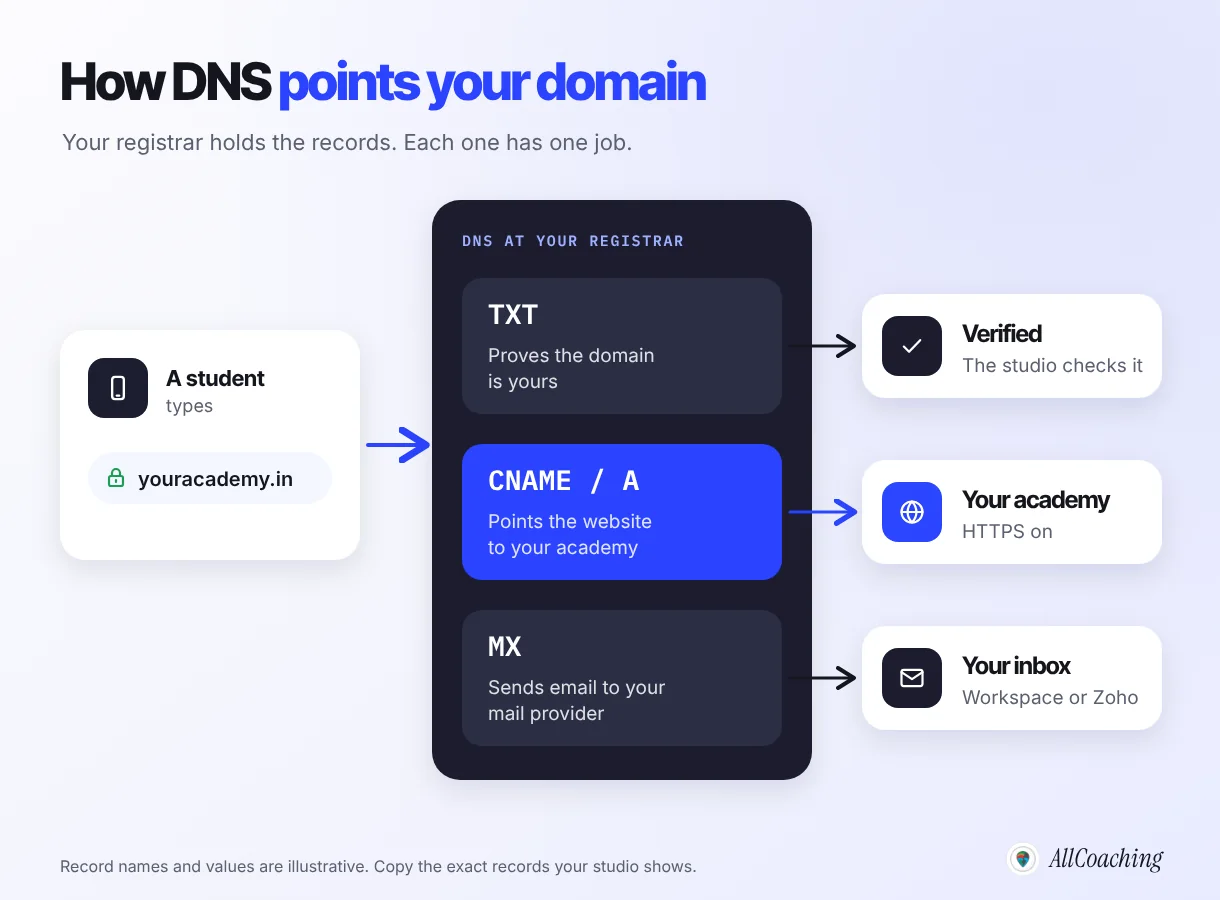
- A record points a name to a server's numeric IP address. It is often used for the bare domain, such as youracademy.in without www.
- CNAME record points a name to another name, such as the address of your academy platform. If the platform's servers change, your record keeps working.
- TXT record holds a short line of text. Platforms use it to check that you control the domain before they connect it.
- MX record tells the internet where email for your domain should go. It has nothing to do with your website, so leave it alone when you connect your academy.
Host, value and TTL
Each record has a host (or name), a value (or target) and a TTL, the number of seconds other networks may cache it. The most common mistake is the host field: many registrars add your domain automatically, so typing www.youracademy.in as the host creates www.youracademy.in.youracademy.in. If the registrar shows your domain next to the box, type only www or @, exactly as your platform instructs.
Why changes take time
Networks that cached the old answer keep using it until their copy expires; this delay is called DNS propagation. A change is usually visible within a few hours, and DNS can take up to 24–48 hours to reach every network.
How to connect your domain to your AllCoaching academy
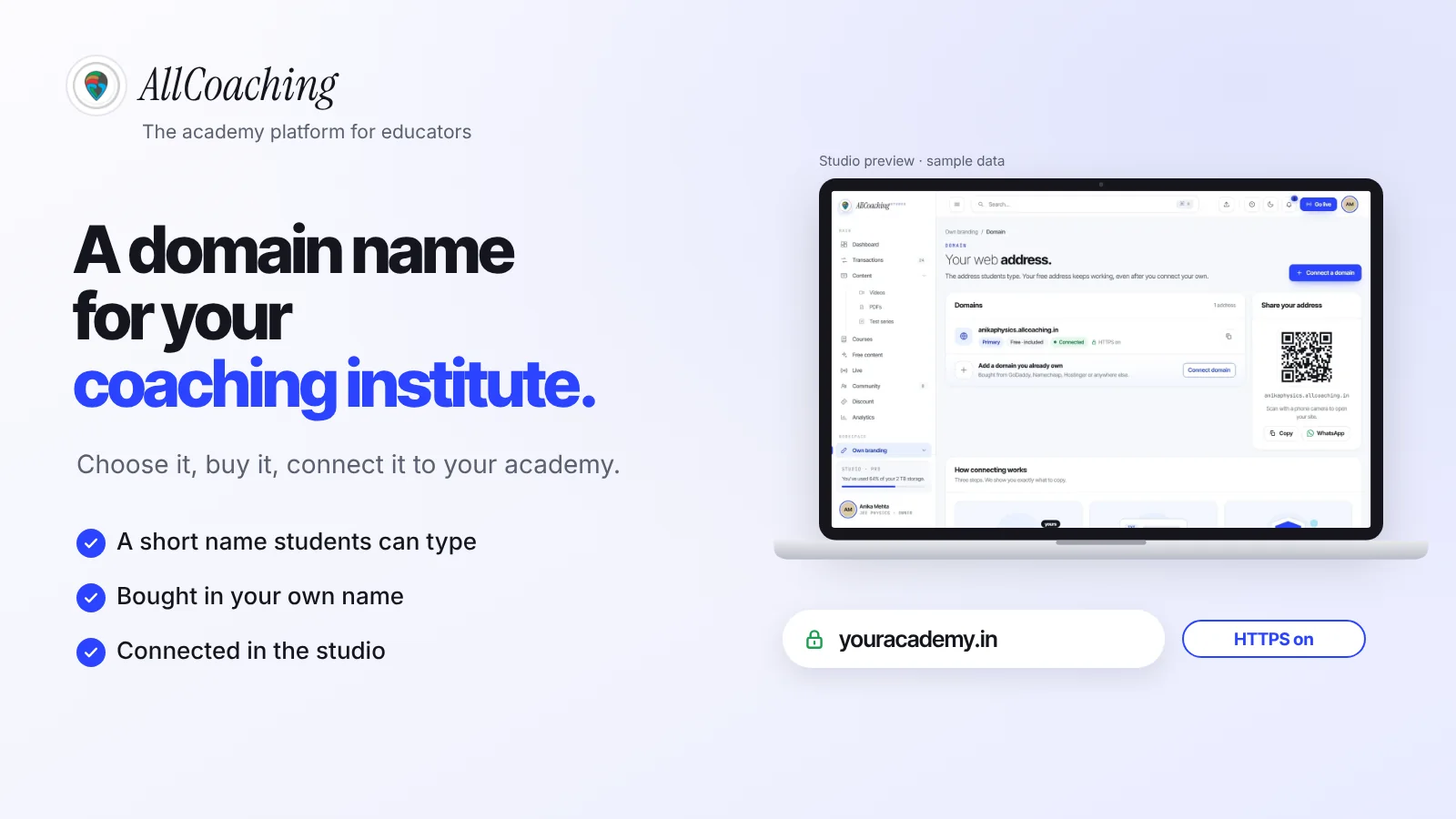
In the AllCoaching studio, open Own branding ▸ Domain, choose "Connect a domain", type your domain, then copy the records the studio shows into your registrar's DNS page. The studio checks the records, marks the domain Connected and switches HTTPS on.
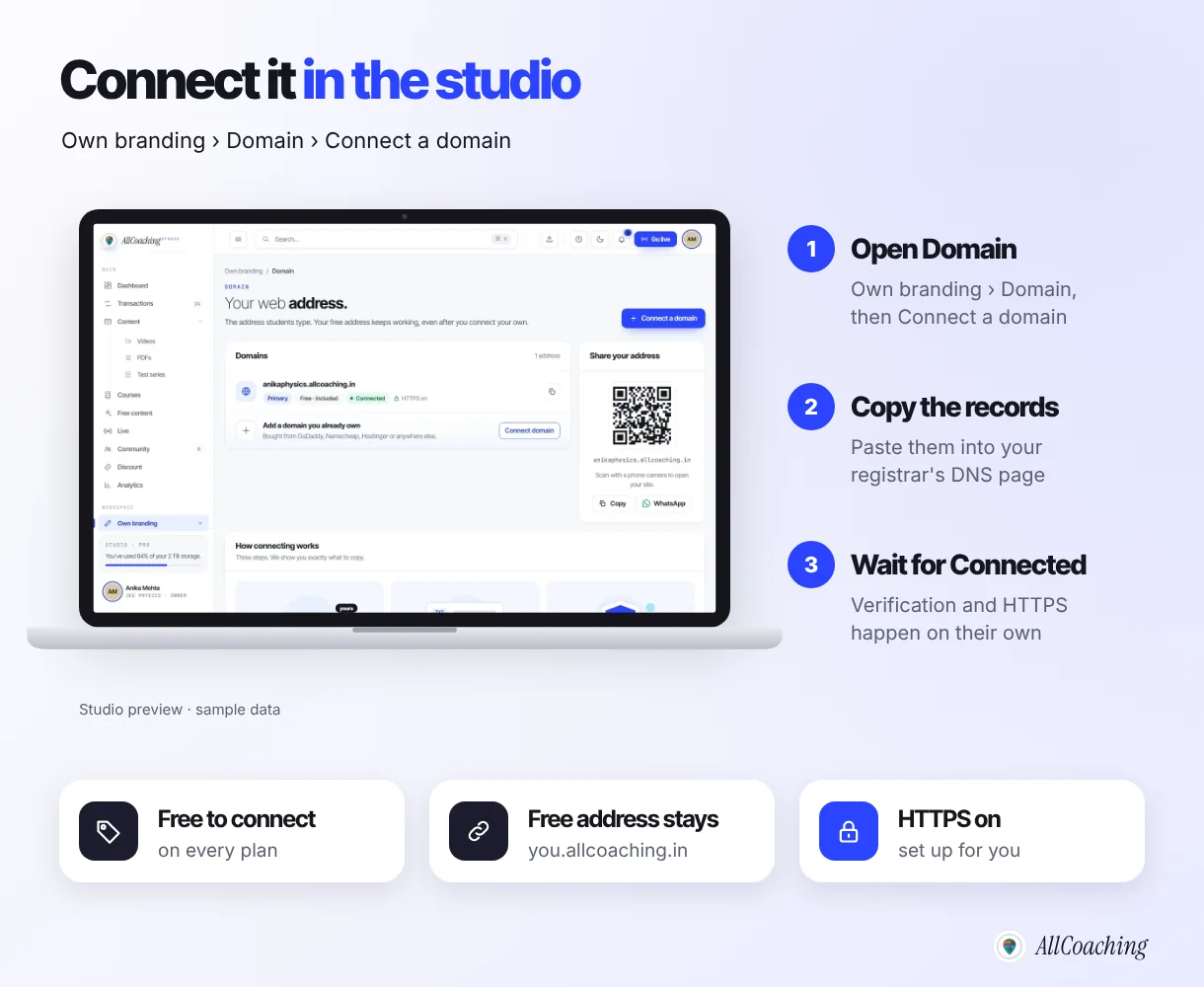
Connecting your own domain is free on every AllCoaching plan, whether you bought it from GoDaddy, Namecheap, Hostinger, BigRock or anywhere else. The studio shows exactly what to copy, typically a TXT record that proves the domain is yours and a record that points it at your academy. Your free handle.allcoaching.in address keeps working after you connect, so links you shared earlier do not break, and you never buy or renew a certificate yourself.
Type the domain without https:// at the start, open your registrar's DNS (or "Manage DNS") page in another tab, and copy and paste each host and value rather than retyping them.
The domain is one part of the academy. On AllCoaching the path is sign up, choose a plan, upload your course, connect your domain and start selling: the same studio runs your courses, tests, live classes, UPI checkout and your own Android app. Every plan starts with a 7-day free trial, no card needed. After that, monthly plans take 0% commission from ₹3,999 a month, or yearly plans start at ₹6,999 a year with a fee per sale; prices exclude GST. See the pricing page for every plan.
Question educators ask
I added the records, but my domain still shows an error. What should I check?
First, give it a few hours; DNS can take up to 24–48 hours. Then check the host field for a doubled domain name, make sure there is no old A or CNAME record on the same host pointing somewhere else, and confirm you edited DNS at the company that actually controls it (if your domain uses another provider's nameservers, records must be added there). If it still does not connect, write to contact@allcoaching.in or WhatsApp +91 98899 77262 with your domain name.
Build your own academy. Try it free for 7 days.
Website on your own domain, your own Android app, unlimited live classes and UPI checkout on every plan. 0% commission on every monthly plan from ₹3,999 a month, or yearly from ₹6,999 (excl. GST).
No card needed · Cancel anytime in the trial · Export your data any timeShould you set up email on your domain?
Email on your domain, such as admissions@youracademy.in, is optional but looks more professional on receipts, posters and parent communication. You set it up with an email provider such as Google Workspace or Zoho Mail, separately from your academy.
The email provider gives you MX records (and usually a TXT record for sender verification) to add at your registrar. These sit alongside your website records without conflict, as long as you do not delete one set while adding the other. Compare the providers' own plan pages before you choose.
After you connect: links, HTTPS and Google
Once your domain shows Connected, update every place students find you, and let Google discover the new address through links and your sitemap. The domain only helps if students actually see it.
- Change the link in your YouTube channel, video descriptions and pinned comments.
- Update your Instagram bio, WhatsApp channel and group descriptions, and Telegram group.
- Print the new address on posters and visiting cards.
HTTPS matters for trust and for search. Google announced in 2014 that it uses HTTPS as a ranking signal, a "very lightweight" one at first.5 More practically, browsers warn students away from pages without it. On AllCoaching it is switched on for your connected domain.
If you are moving an older website, such as a WordPress site, ask whoever runs it to redirect each old page permanently to its new address. Google's site-move guidance says that "301 and other permanent redirects don't cause a loss in PageRank".4 Then follow our online academy SEO guide for beginners to get the new pages found. If your students currently live in a WhatsApp group, our guide to turning a WhatsApp group into an online academy shows how to move them across.
Common domain mistakes coaching institutes make
The costly domain mistakes are letting someone else own it, choosing a name with hyphens, numbers or a year, letting it expire, and breaking email or the website while editing DNS. Each has a simple fix.
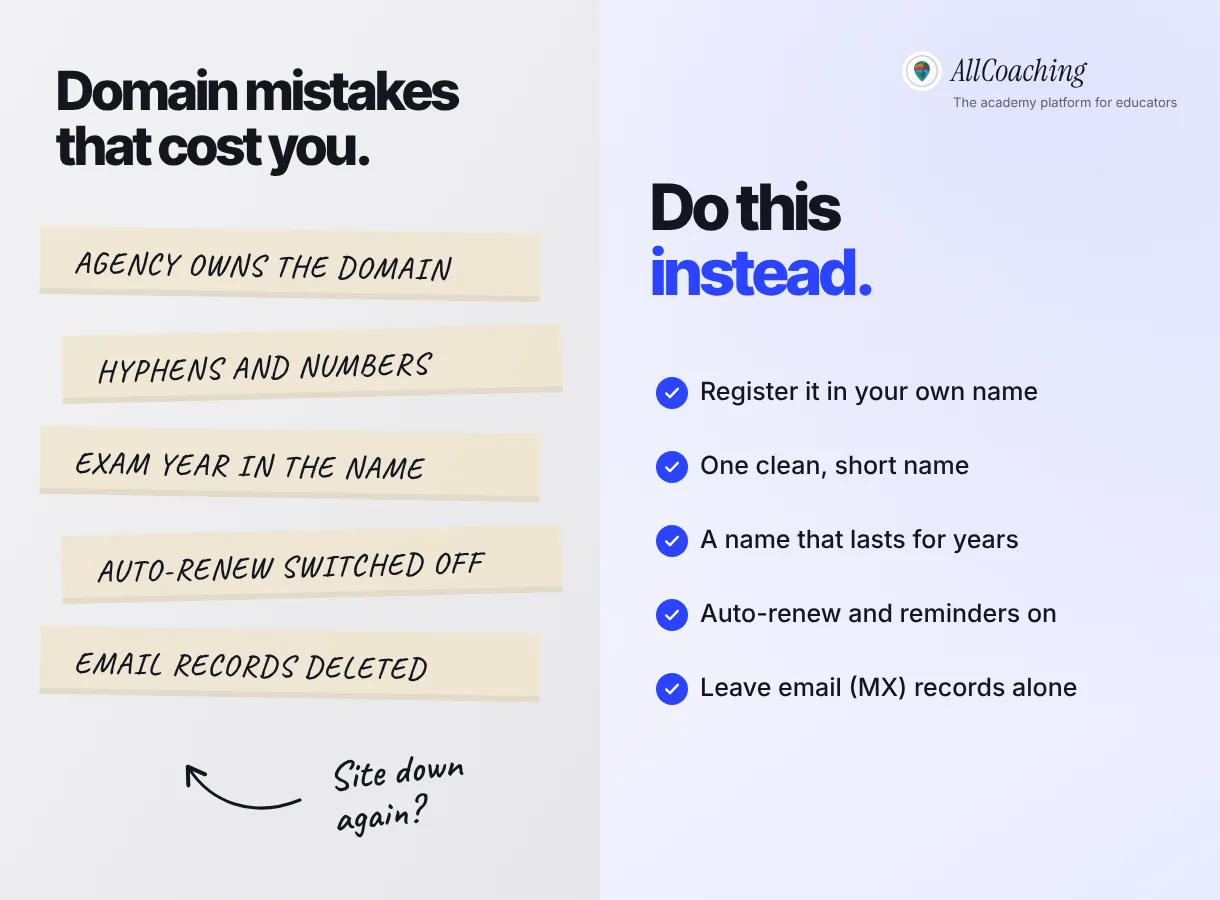
- An agency or relative owns the domain. Move it into a registrar account in your name.
- Hyphens and numbers. Each one has to be explained aloud; choose a cleaner name or ending.
- An exam year in the name. Put exams and years in course pages, not the domain.
- Auto-renew switched off. A lapsed domain takes your site and email down at once.
- Deleting records you do not recognise. MX and TXT records often run your email; leave them.
- Promoting an empty site. Build on the free address first, then connect the domain before you promote it.
For the full launch sequence around the domain, from planning the first course to the first sale, see how to start an online academy in 5 steps, and for what an academy includes beyond its address, what an online academy is.
Glossary
- Domain name
- Your academy's address on the internet, such as youracademy.in, rented yearly from a registrar and pointed at your website.
- Registrar
- A company accredited to sell and manage domain names, such as GoDaddy, Namecheap, Hostinger or BigRock. You buy, renew and edit DNS for your domain there.
- TLD (top-level domain)
- The ending of a domain name, such as .in, .com or .academy. Country-code endings like .in are run by a national registry.
- DNS
- The Domain Name System, the internet's address book that turns a domain name into the location of the server that answers for it.
- A record
- A DNS record that points a domain or subdomain to a server's numeric IP address.
- CNAME record
- A DNS record that points a domain or subdomain to another domain name, such as your academy platform's address.
- TXT record
- A DNS record holding a line of text, used by platforms and email providers to verify that you control the domain.
- SSL / HTTPS
- The encryption that puts a padlock in the browser's address bar. It needs a certificate, which an academy platform can issue and renew for your connected domain.
- DNS propagation
- The delay between saving a DNS change and every network seeing it, caused by caching. Usually a few hours; it can take up to 24–48 hours.
- WHOIS
- The public registration data for a domain, such as who holds it and when it expires. Privacy protection hides personal contact details from it.
Frequently asked questions
What is a good domain name for a coaching institute?
A good domain name for a coaching institute is short, easy to say once, and has no hyphens, numbers or exam year in it. Your own name, your academy's name, or your subject plus a short word usually works best, for example a name like sharmabiology.in. Check that it is free as a social handle and is not someone else's trademark.
Should I choose .in or .com for my coaching institute?
Choose .in if you mainly teach students in India; it is short and clearly Indian. Choose .com if you also teach students abroad or your exact name is free there. Use .co.in or .academy only when your first choice is taken, and buy both .in and .com if you can to protect the brand.
How much does a domain name cost in India?
A typical .in or .com domain costs about ₹600 to ₹1,200 a year at most registrars. First-year offers are often lower than the renewal price, so check the renewal price before you buy. Newer endings such as .academy can cost more.
Where can I buy a domain name for my coaching institute?
You can buy it from any domain registrar, such as GoDaddy, Namecheap, Hostinger or BigRock. Register it in your own name with your own email and payment method, and turn on privacy protection and auto-renew at checkout.
Do I need to buy hosting or an SSL certificate with my domain?
Not if you use an academy platform. The platform hosts your website and handles HTTPS. On AllCoaching, HTTPS is switched on for your connected domain, so you only need to buy the domain itself.
How do I connect my domain to my AllCoaching academy?
Open the AllCoaching studio, go to Own branding, then Domain, choose Connect a domain and type your domain. Then add the records the studio shows, usually a TXT record and a CNAME or A record, on your registrar's DNS page. The studio verifies them and switches HTTPS on.
How long does it take for a new domain to start working?
Usually within a few hours of adding the DNS records. Because networks cache old DNS answers, it can take up to 24 to 48 hours to reach every network. Your free allcoaching.in address keeps working in the meantime.
Does connecting my own domain cost extra on AllCoaching?
No. Connecting your own domain is free on every AllCoaching plan. You pay only your registrar for the domain itself, typically about ₹600 to ₹1,200 a year for a .in or .com.
Can I keep my domain if I change platforms later?
Yes, if the domain is registered in your name. The domain belongs to the registrant, not to the platform it points at, so you can change its DNS records to point at any other website. This is why you should never let an agency or vendor register it for you.
Sources
- ICANN, "Registering Domain Names", icann.org, checked October 2026.
- ICANN, "Expired Registration Recovery Policy", icann.org, section 2.1.1, checked October 2026.
- .IN Registry (National Internet Exchange of India), registry.in, checked October 2026.
- Google Search Central, "Site moves and migrations", developers.google.com, checked October 2026.
- Google Search Central Blog, "HTTPS as a ranking signal", 6 August 2014, developers.google.com, checked October 2026.
Amit builds AllCoaching, the academy platform Indian educators set up themselves: their own website on their own domain, their own app, and the tools to grow it. We help educators connect their domains in the studio, so this guide follows the order that causes the fewest problems; outside facts are linked to their sources and example names are illustrative.