
On this page
Start your online academy today. 7 days free.
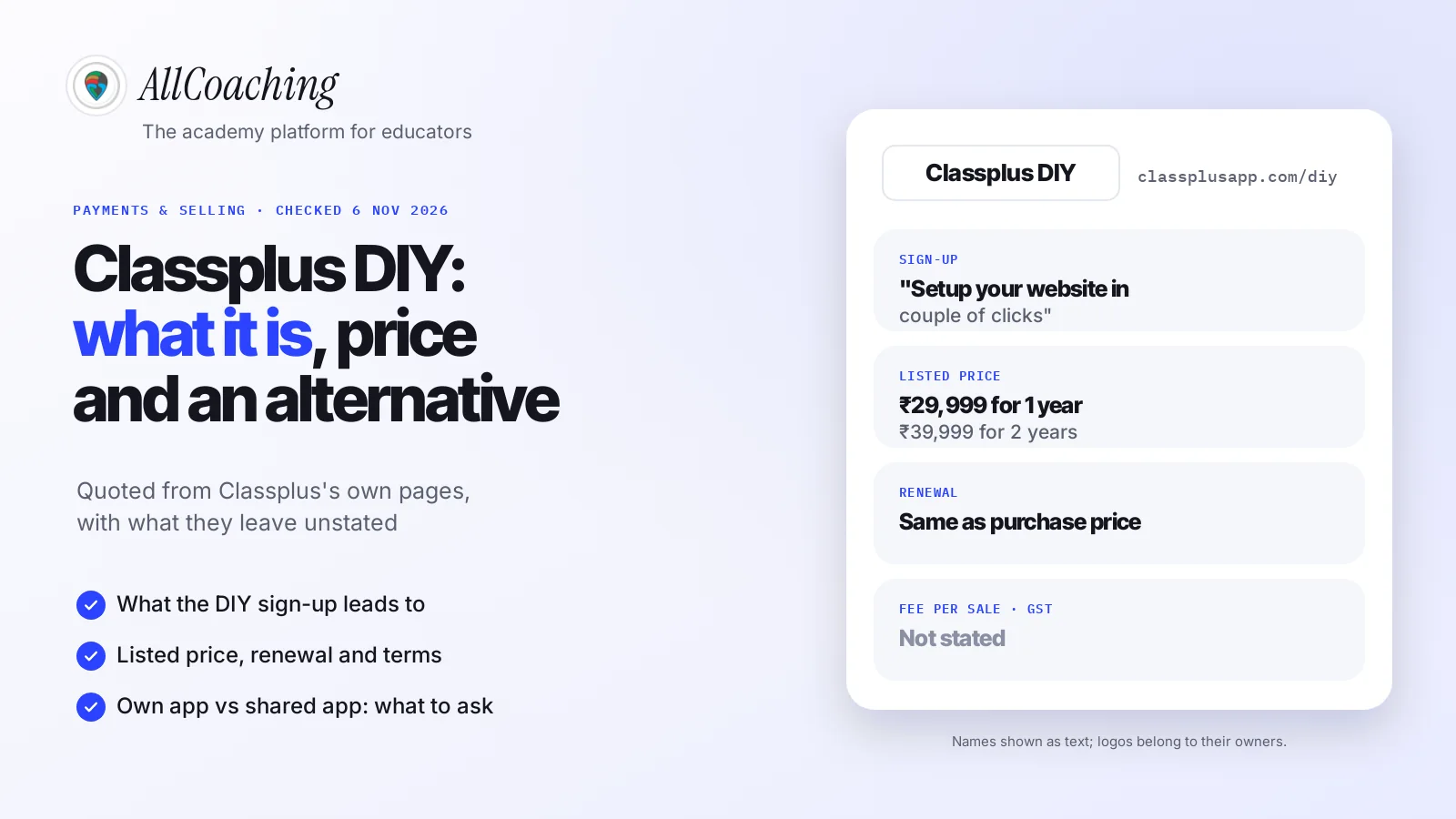
Start free trialClassplus DIY is the self-serve entry point to Classplus: a sign-up and login page at classplusapp.com/diy, headed "Setup your website in couple of clicks", which Classplus's own blog menu labels "Create your own App". Behind it is Classplus's coaching app and website product, which its pricing page lists at ₹29,999 for one year.
You probably searched for it after a YouTube ad or a friend's recommendation. You teach SSC maths or NEET biology, or you run a spoken English batch, and you want an app with your name on it without hiring a developer. "DIY" sounds like exactly that. The useful question is what the do-it-yourself part covers, and what still depends on someone else.
This guide reads Classplus's own pages, quotes them, marks what they leave unstated, and then lists what to check in any self-serve coaching app: own app or shared app, whose developer account, your domain, fees, data export and switching. If you are already comparing several platforms, our Classplus alternatives guide covers six of them.
Key takeaways
- Classplus DIY is a sign-up and login page at classplusapp.com/diy, titled "Classplus | DIY", with the line "Setup your website in couple of clicks" (checked 6 Nov 2026).
- Classplus links it as "Create your own App"; its create-your-own-app page says "Get your own online coaching app in under 60 seconds".
- The listed price is ₹29,999 for one year or ₹39,999 for two years on Classplus's pricing page; the fee per sale, GST and a free trial are not stated there.
- Renewal costs the same as the purchase price, says Classplus's FAQ, and its terms say a subscription cannot be cancelled before it expires and is not refunded if you stop early.
- Classplus says the app is "registered in your Coaching’s name"; whose Google Play developer account it is published on is not stated, so ask in writing.
- Before any self-serve app, check five things: own app or shared app, whose developer account, your own domain, total fees, and how you export students and content.
- AllCoaching takes 0% commission on every monthly plan from ₹3,999 a month, or yearly from ₹6,999 + 10% per sale, + 18% GST, with a 7-day free trial and no card needed.
What is Classplus DIY? The short answer
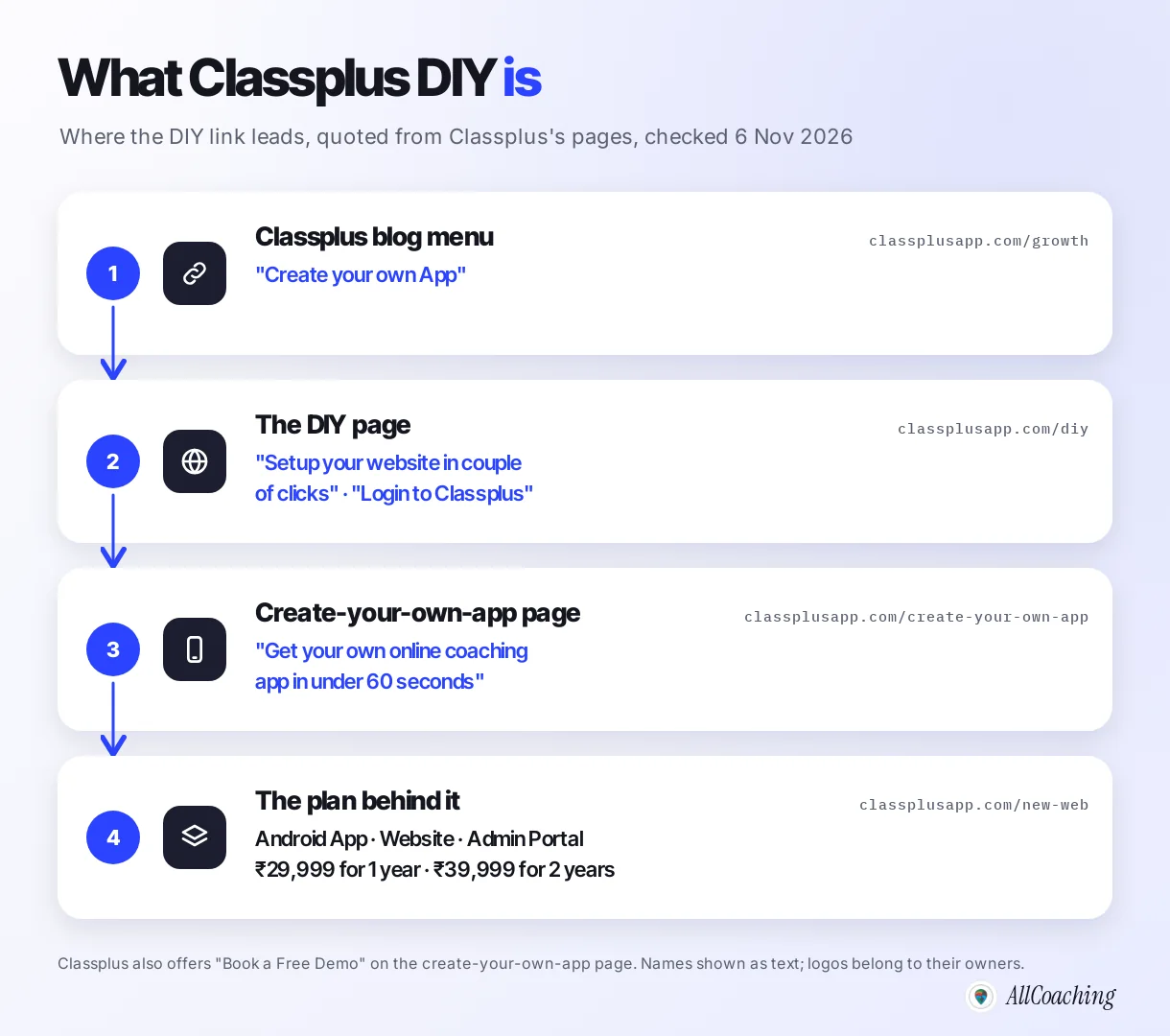
Classplus DIY is Classplus's self-serve sign-up for its coaching app and website. The page at classplusapp.com/diy opens a login screen titled "Classplus | DIY" that reads "Setup your website in couple of clicks" and asks for a mobile number or email. Classplus's blog menu links to it as "Create your own App".1
So "DIY" (do it yourself) is not a separate company or a separate app on the Play Store. It is the route by which an educator starts with Classplus without first booking a call. When we searched Google Play for "classplus diy" on 6 November 2026, no app with that name appeared; the top result was Classplus's own teaching app.
If you already have a Classplus account, Classplus's own login page is at classplusapp.com/diy/login. The rest of this guide is for educators deciding whether to start there.
How we checked Classplus DIY
We opened five Classplus pages on 6 November 2026, read them in a browser, and quoted only what they showed: the DIY login page, the create-your-own-app page, the pricing page and its FAQ, the terms and conditions, and Classplus's Google Play listing. We did not sign up, so anything shown only after login is outside this guide.
Where a page did not answer a question, the table says "not stated". We did not round any price, and we did not guess at fees, taxes or account ownership. Classplus can change any of these pages; open them yourself before you decide.
What Classplus DIY offers, in Classplus's own words
Classplus's pages describe DIY as the quick way to your own coaching app: "Get your own online coaching app in under 60 seconds" The plan behind it lists an Android app, a website, an admin portal, unlimited recorded courses, live classes, student enrolments and storage.23
The DIY page
classplusapp.com/diy redirects to /diy/login. The left side says "Setup your website in couple of clicks!"; the right side says "Login to Classplus", with a +91 mobile number field, a "Login via Email" option and the line "by signing up, you agree to our T&C and Privacy Policy".1 The same screen serves new sign-ups and existing users.
The create-your-own-app page
Classplus's create-your-own-app page has a "Get Your Own App" button that leads to the same DIY login. The page also offers "Book a Free Demo" with a form for your institute's name, mobile and email, so a sales conversation is available alongside the self-serve route.2
The plan and its FAQ
Classplus's pricing page lists what the plan includes: "Android App, Website, Admin Portal, Unlimited Recorded Courses, Unlimited Live Classes, Unlimited Student Enrolments, Unlimited Storage, A.I. Powered Leads, And Much More". Its FAQ answers several questions directly:3
- Your name on the app: "The app that is developed, will be registered in your Coaching’s name and will bear your Logo."
- Delivery: "Your app will be delivered in 5-6 days."
- Website: "you get a mini website along with the app through which you can sell courses."
- Students: "the app allows you to teach unlimited students", and you can add existing offline students.
- Live classes: "You can take a live class upto 4 hours."
- Tests: "the test module allows you to conduct unlimited exams and share their results with the students."
Question educators ask
Is Classplus DIY the same as the Classplus Lite app?
Classplus does not say so. Classplus Lite is a separate app on Google Play from Bunch Microtechnologies, which describes it as "a Free Online Teaching App" for creating batches, chatting with students, sending assignments and collecting fees.5 Students use it under the Classplus name, whereas the paid plan is described as an app in your coaching's name.
Classplus DIY price: what the pages show
Classplus's pricing page lists ₹29,999 for one year (against a struck-out ₹34,999) and ₹39,999 for two years (against ₹44,999). Its FAQ says renewal costs the same as the purchase price. The page does not state a fee per sale, GST or a free trial.3
| Question | What Classplus's page says | Source, checked 6 Nov 2026 |
|---|---|---|
| Price for 1 year | ₹29,999 (struck-out ₹34,999) | classplusapp.com/new-web |
| Price for 2 years | ₹39,999 (struck-out ₹44,999), "Recommended for medium & large coaching centres" | classplusapp.com/new-web |
| Renewal | "Renewal charges are the same as the purchase price." | classplusapp.com/new-web, FAQ |
| Fee on each sale | Not stated | classplusapp.com/new-web |
| GST | Not stated | classplusapp.com/new-web |
| Free trial | Not stated | classplusapp.com/new-web and /diy |
| Cancelling early | "you cannot cancel it before its expiration"; no refunds if you stop during the term | classplusapp.com/termsconditions.html |
Why you may also see ₹1,250 a month
Classplus's create-your-own-app page, which links to the DIY login, has an earnings calculator that shows "Your monthly investment ₹1250/ (fixed)".2 The page footer reads © 2021, and it does not say which plan that figure belongs to or whether GST is extra. Twelve months at ₹1,250 is ₹15,000, which differs from the ₹29,999 on the pricing page, so ask Classplus which price applies to you. The calculator also shows potential earnings; we do not repeat them, because they are estimates, not a price.
The terms matter as much as the price. Classplus's terms say: "The subscription term will end on the expiration date and you cannot cancel it before its expiration. Bunch will not provide refunds if you decide to stop using the Website during your subscription term."4 In plain words, the one-year or two-year amount is a commitment for that whole period.
Who Classplus DIY suits
Classplus suits a coaching owner who wants an app delivered for them, a published one-year price, and is comfortable paying for the whole year up front. Its pages promise delivery in 5–6 days, unlimited students and a test module, and a demo is there for those who prefer to talk first.
- An established offline institute that wants its existing students on an app quickly, and already knows it will use it for at least a year.
- An owner who prefers a team to set things up rather than work through settings alone.
- A two-year plan buyer: Classplus recommends the ₹39,999 two-year plan for "medium & large coaching centres".
It suits less well if you want to start small and pay monthly, stop any month, put the academy on your own domain from day one, or know your total cost including any fee per sale before you commit. Those are questions to ask, not reasons to rule it out. Our AppX vs Classplus comparison lists the questions to ask both companies before you sign.
Classplus DIY vs your own app: shared app, branded app and developer account
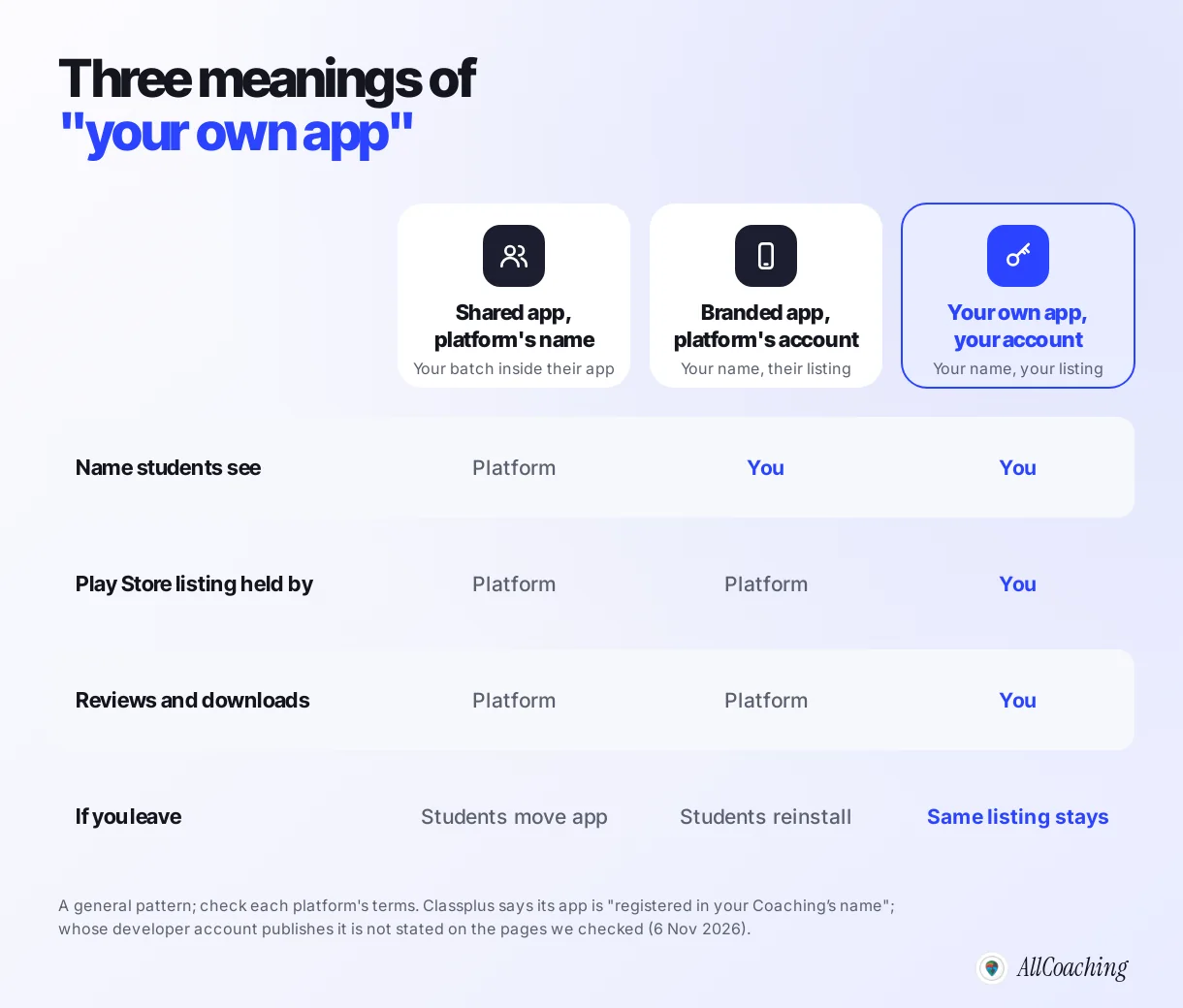
"Your own app" can mean three different things: your course inside the platform's shared app, a branded app published on the platform's developer account, or your own app published on your own Google Play developer account. Only the last one stays yours if you move. Ask which one you are buying.
1. A shared app
Students download the platform's app and find your batch inside it. Classplus Lite works this way: it is listed on Google Play under Bunch Microtechnologies and described as a free teaching app.5 It is quick to start, but the listing, the reviews and the name students search for belong to the platform.
2. A branded app on the platform's account
The app carries your name and logo, but the Play Store listing sits in the platform's developer account. Students see your brand. If you leave, the listing usually cannot move with you, so students install a new app.
3. Your own app on your own developer account
The app is published on your own Google Play Console (and App Store account for iOS). The listing, its reviews and its download history stay in your account, and a later platform change can update the same listing instead of starting from zero.
Classplus's FAQ says the app "will be registered in your Coaching’s name and will bear your Logo".3 None of the pages we checked says whose developer account the listing is published on, so ask: "Will the app be published on my own Google Play developer account, and can I keep the listing if I leave?" Our guide to choosing an LMS with a mobile app explains the developer-account question in more detail.
What to check before choosing any self-serve coaching app
Before you pay any self-serve coaching app, Classplus or anyone else, get written answers on eight things: the kind of app, the developer account, your domain, the fee per sale, GST and gateway charges, renewal, cancellation, and how you export your students and content. Each answer changes either what you own or what you pay.
- Own app or shared app? Will students download an app with your name, or find you inside the platform's app?
- Whose developer account? Is the listing on your own Google Play Console, or the platform's?
- Your own domain? Can the website run on youracademy.in, or only on a platform address?
- Fee per sale? Is any percentage taken from each student payment, on top of the plan price?
- GST and gateway charges? Is GST included in the listed price, and what does the payment gateway charge per transaction?
- Renewal and cancellation? What does the second year cost, and can you stop before the term ends?
- Data export? Can you download your student list, payments and content, and for how long after you stop?
- Switching? If you move later, what happens to the app listing and to students in an active batch?
From the Classplus pages we checked, items 1 (an app in your coaching's name) and 6 (renewal at the purchase price; no early cancellation) are answered; items 2, 3, 4, 5 and 7 are not stated. The Classplus vs Graphy vs AllCoaching comparison applies the same questions to three platforms at once.
Classplus DIY vs AllCoaching: verified facts side by side
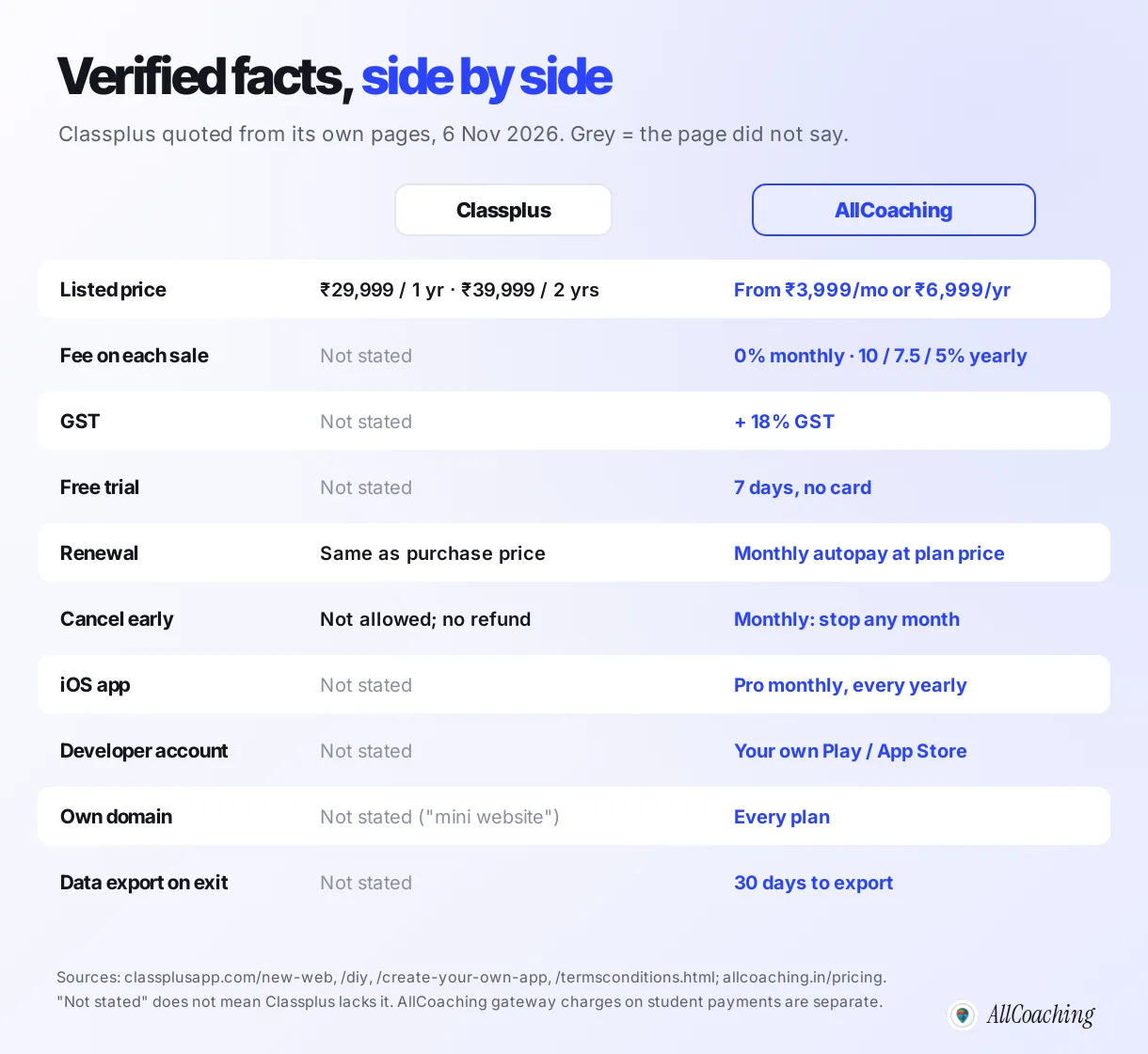
Side by side, the clearest differences are how you pay (a one- or two-year amount up front versus monthly or yearly plans with published fees), whose developer account the app uses, and what the pages say about leaving. Every Classplus cell is quoted from its own pages on 6 November 2026.
| What you check | Classplus (DIY sign-up) | AllCoaching |
|---|---|---|
| How you start | Sign up at classplusapp.com/diy with mobile or email; a free demo is also offered | Sign up at studio.allcoaching.in; set it up yourself, no sales call |
| Listed price | ₹29,999 for 1 year; ₹39,999 for 2 years | Monthly: Starter ₹3,999, Growth ₹5,999, Pro ₹7,999. Yearly: Starter ₹6,999, Growth ₹12,999, Pro ₹24,999 |
| Fee on each sale | Not stated | 0% on every monthly plan; 10%, 7.5% or 5% on yearly plans |
| GST | Not stated | Prices + 18% GST |
| Free trial | Not stated | 7 days, no card needed |
| Renewal and stopping | Renewal same as purchase price; cannot cancel before expiry, no refund for stopping early | Monthly: stop any month, runs to the end of the paid month |
| Android app | Listed; "registered in your Coaching’s name" | Own Android app on every plan |
| iOS app | Not stated (plan lists "Android App") | On Pro monthly and every yearly plan |
| Developer account | Not stated | Your own Google Play / App Store account |
| Website and domain | "a mini website along with the app"; own domain not stated | Academy website on your own domain, every plan |
| If you stop | Data export not stated; terms say user content remains the user's property | Offline at end of paid period, then 30 days to export content and data |
Classplus's terms also say: "All User Content remains the property of such User and constitutes the intellectual property of the such User alone."4 That is a good sign for ownership; what to confirm is the practical side, which is how and in what format you can download it.
Where AllCoaching differs
AllCoaching is built so the academy is yours by design: you sign up, choose a plan, upload your course, connect your domain and start selling, and your Android app is published on your own Play Store account. The difference from a delivered app is not effort or speed; it is who holds each piece afterwards.
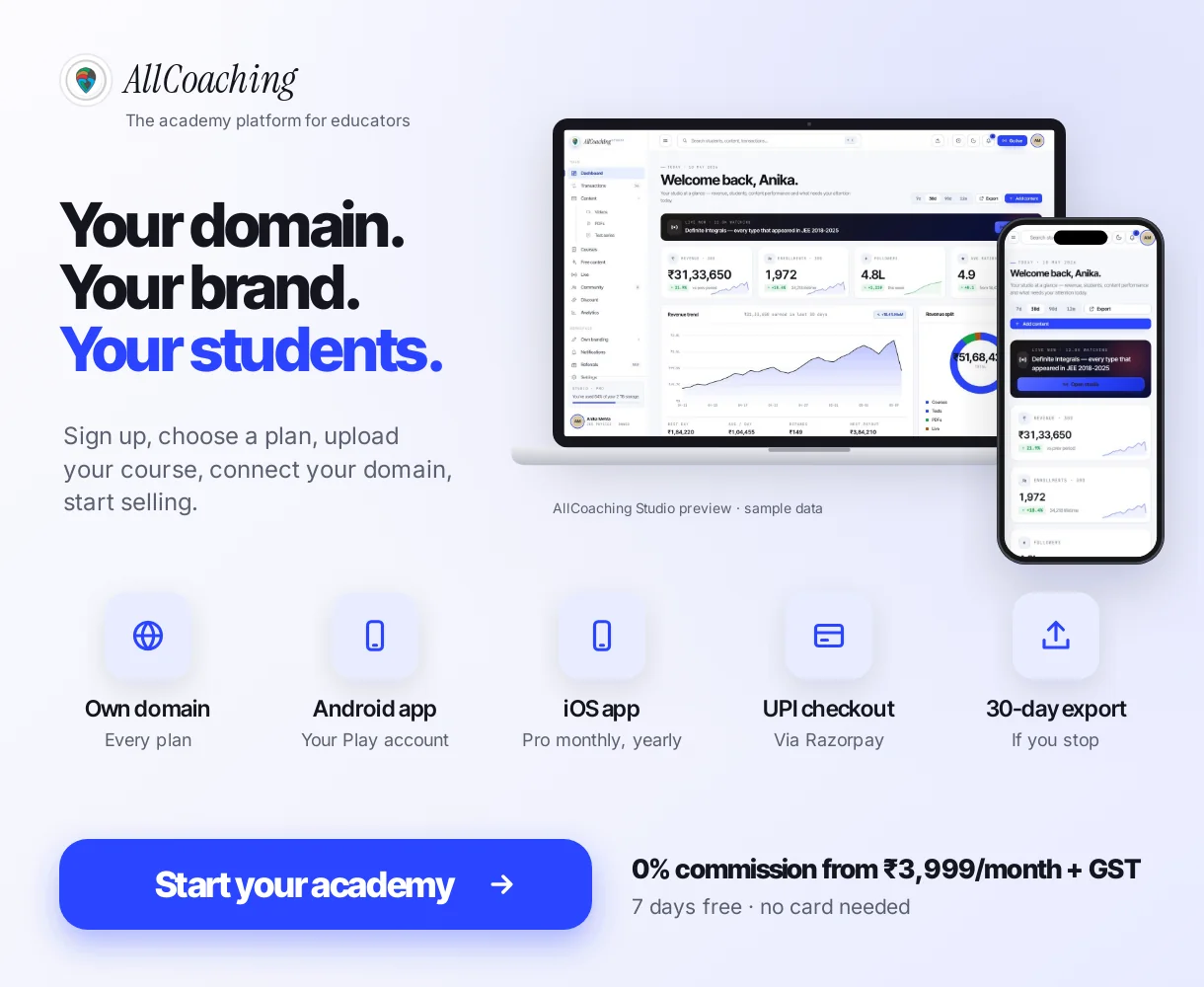
- Pay the way your income comes in. Monthly plans take 0% commission: Starter ₹3,999, Growth ₹5,999 and Pro ₹7,999 a month, and you can stop any month. Yearly plans have a lower fixed fee and a fee per sale: Starter ₹6,999 a year + 10%, Growth ₹12,999 + 7.5%, Pro ₹24,999 + 5%. Prices exclude 18% GST; there is no sales limit and no setup fee.
- Your developer account, your listing. The Android app is on every plan and iOS on Pro monthly and every yearly plan, published on your own Google Play and App Store accounts, by you or by us with API access.
- Your domain from day one. Every plan connects your own domain, with a course page, SEO and checkout created when you save a course.
- A known exit. If you stop, your academy goes offline at the end of the paid period and you get 30 days to export your content and data.
Test series with all-India rank and percentile, an anti-cheat full-screen lock, branded certificates and bulk student import from Excel or Google Sheet are on every plan. More than 500 educators already sell on AllCoaching, and every plan starts with a 7-day free trial, no card needed. Full plan details are on the pricing page.
Build your own academy. Try it free for 7 days.
Website on your own domain, your own Android app, unlimited live classes and UPI checkout on every plan. 0% commission on every monthly plan from ₹3,999 a month, or yearly from ₹6,999 (excl. GST).
No card needed · Cancel anytime in the trial · Export your data any timeHow to evaluate a self-serve app and switch without losing students: 7 steps
Ask your current or shortlisted platform the eight questions in writing, export your student list, build the new academy in a free trial, run both side by side, send new admissions to the new academy, and close the old plan only after the last batch ends. Nobody loses access, and you never pay two platforms for long.
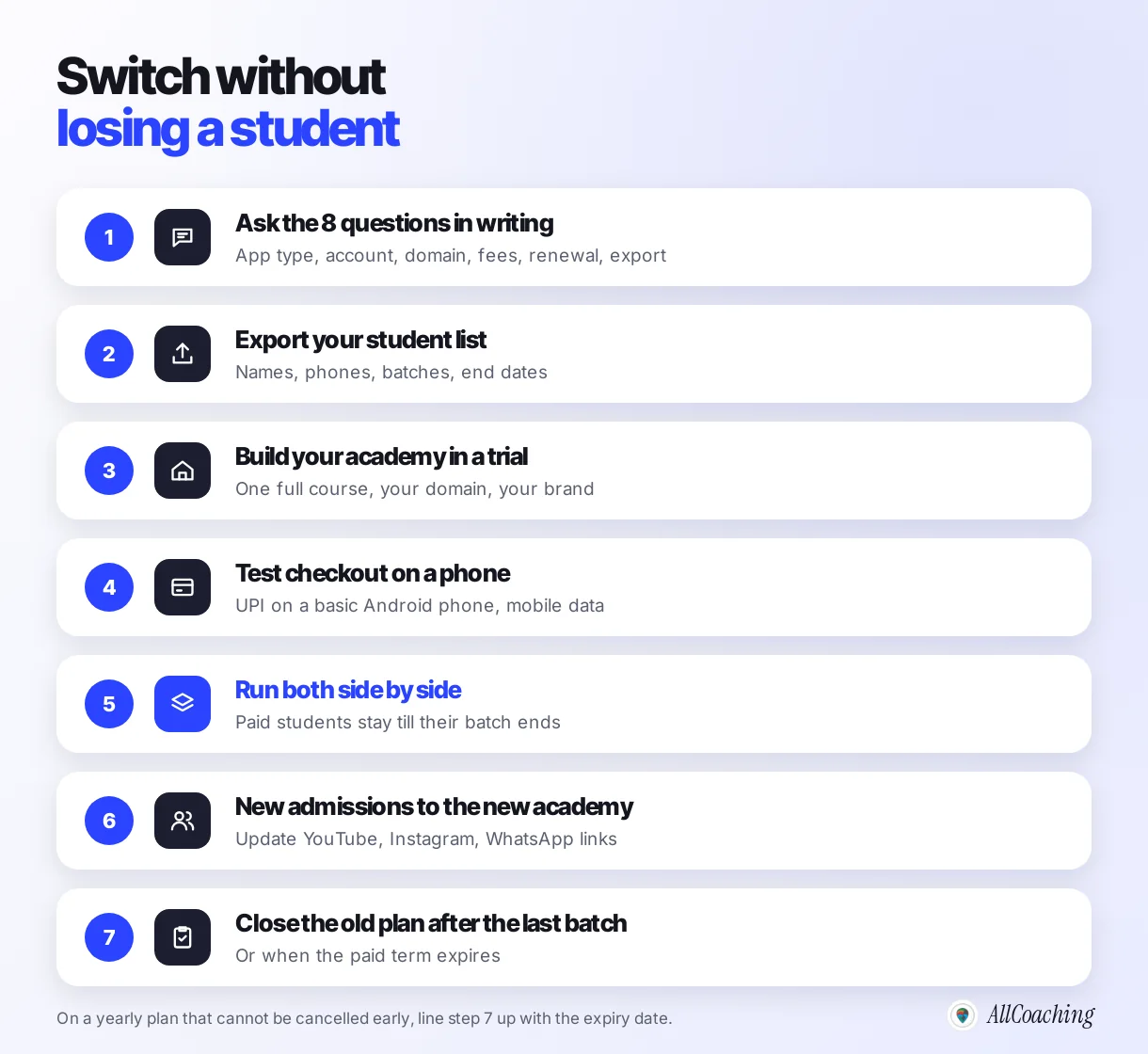
- Ask the eight questions in writingSend your current or shortlisted platform the questions on app type, developer account, domain, fee per sale, GST, renewal, cancellation and data export, and keep the replies.
- Export your student listDownload names, phone numbers, emails and batch details as a spreadsheet before you change anything, and note each batch's end date.
- Build the new academy in a free trialUpload one full course, connect your domain and set your brand, so students will see your name, not the platform's.
- Test checkout on a phoneBuy your own course by UPI on a basic Android phone on mobile data, and fix anything that would make a student give up.
- Run both side by sideKeep current students on the old app until their batch ends; nobody who has paid loses access.
- Send new admissions to the new academyChange the link in your YouTube description, Instagram bio and WhatsApp group so every new student enrols in your own academy.
- Close the old plan after the last batchWhen the last batch on the old app ends, or the paid term expires, export everything once more and stop renewal.
If you are on a one-year Classplus plan, step 7 lines up with its expiry date, because the terms do not allow early cancellation. The full message templates for students and parents are in how to switch coaching apps without losing your students.
Mistakes to avoid with any self-serve coaching app
The common mistakes are taking "DIY" to mean you own everything, comparing only the headline price, not asking whose developer account the app uses, paying for a year without reading the cancellation terms, and having no export plan. Each takes five minutes to avoid before you pay.
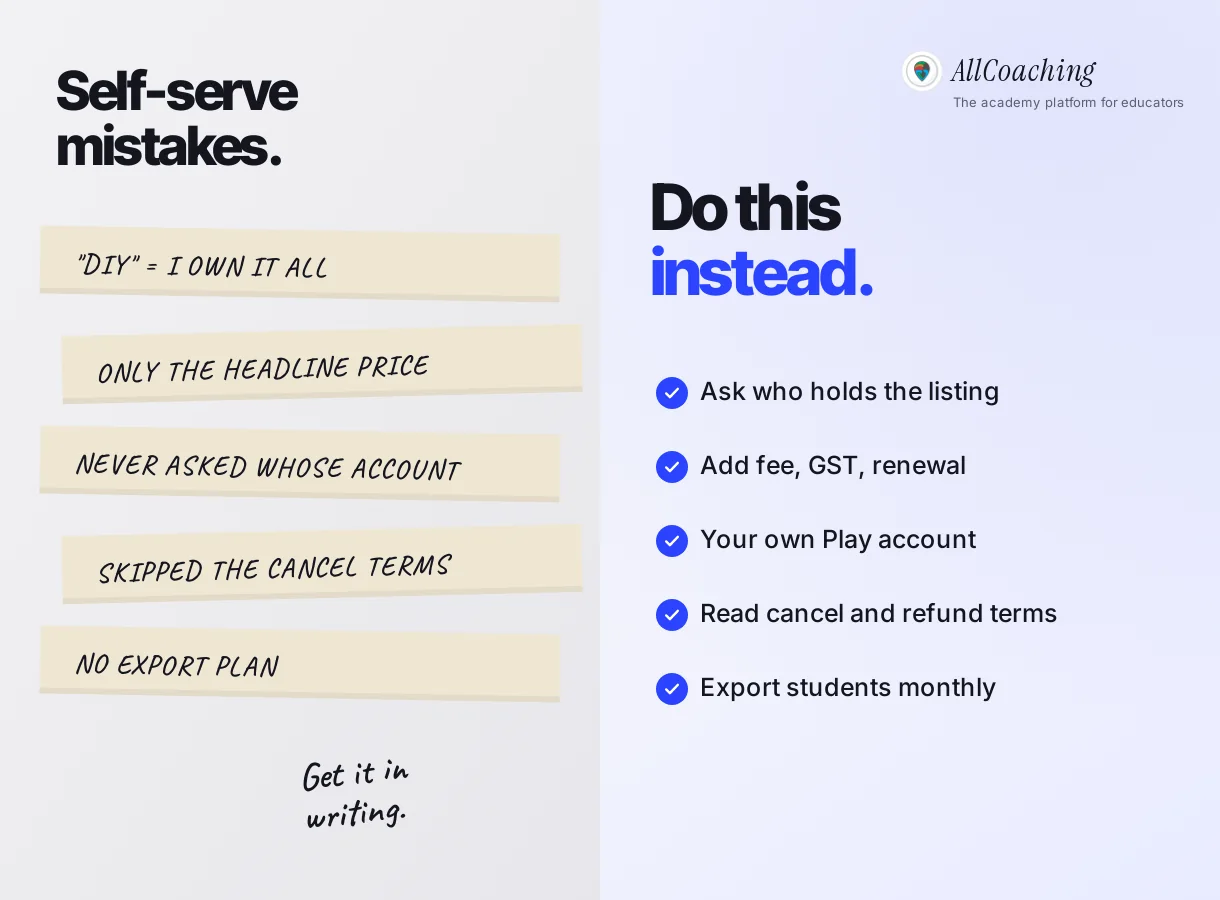
- "DIY" means I own it all. Self-serve describes how you sign up, not who owns the listing or the domain. Ask both.
- Only the headline price. Add any fee per sale, GST, gateway charges and the second year's renewal.
- No question about the developer account. It decides whether students reinstall when you move.
- Not reading cancellation terms. A yearly plan you cannot cancel is a year's commitment, whatever happens to your batch.
- No export plan. Download your student list every month, wherever you teach.
We built AllCoaching after watching educators spend more evenings fighting their tools than teaching. Whatever you pick, pick the one whose answers you have in writing. For a wider view of platform types, see the best platform to sell online courses in India.
Glossary
- DIY (do it yourself)
- A self-serve way to start: you sign up and set things up without first speaking to a sales team. It describes how you begin, not who owns the result.
- Self-serve platform
- A platform you can sign up for, configure and pay for on your own, with published prices and no mandatory sales call.
- Shared app
- One app published by the platform under its own name, in which many educators' batches and courses sit side by side.
- White-label app
- An app built by a platform but shown under the educator's name and logo. Whose developer account publishes it is a separate question.
- Developer account
- The Google Play Console or Apple App Store Connect account an app is published from. The account holder controls the listing, its reviews and its updates.
- Renewal charge
- What you pay to continue a plan after its first term ends. Classplus's FAQ says its renewal equals the purchase price.
- Fee per sale
- A percentage of each student payment that a platform takes, on top of or instead of a fixed plan price.
- Custom domain
- Your own web address, such as youracademy.in, connected to your academy website instead of a platform sub-address.
Frequently asked questions
What is Classplus DIY?
Classplus DIY is Classplus's self-serve sign-up and login for its coaching app and website, at classplusapp.com/diy. The page is titled "Classplus | DIY" and says "Setup your website in couple of clicks". Classplus's blog menu links to it as "Create your own App" (checked 6 November 2026).
How much does Classplus DIY cost?
Classplus's pricing page lists ₹29,999 for one year and ₹39,999 for two years, against struck-out prices of ₹34,999 and ₹44,999, checked on 6 November 2026. The page does not state GST, a fee per sale or a free trial. An older Classplus page shows ₹1,250 a month in an earnings calculator, so ask Classplus which price applies.
Does Classplus DIY give me my own app?
Classplus's FAQ says the app "will be registered in your Coaching’s name and will bear your Logo" and is delivered in 5 to 6 days. The pages we checked do not say whose Google Play developer account it is published on, so ask whether you can keep the listing if you leave.
What are Classplus renewal charges?
Classplus's FAQ says "Renewal charges are the same as the purchase price." On the listed one-year plan that would mean ₹29,999 again for the second year, before any GST, which the page does not state.
Can I cancel a Classplus plan before it ends?
Classplus's terms say the subscription cannot be cancelled before its expiration date and that no refund is given if you stop using it during the term. Treat a one-year or two-year plan as a commitment for the full period.
Is Classplus DIY the same as Classplus Lite?
Classplus does not say they are the same. Classplus Lite is a separate app on Google Play from Bunch Microtechnologies, described as a free online teaching app for batches, chat, assignments and fee collection, used under the Classplus name. The paid plan is described as an app in your coaching's name.
What is a good Classplus DIY alternative?
It depends on what you want to own. If you want your app on your own developer account, your own domain and monthly billing, look at own-academy platforms. AllCoaching takes 0% commission on every monthly plan from ₹3,999 a month plus GST, or yearly from ₹6,999 plus 10% per sale, with a 7-day free trial.
Can I move from Classplus to another platform without losing students?
Yes, if you run both side by side. Keep current students on Classplus until their batch or paid term ends, send all new admissions to your new academy, and close the old plan after the last batch. Export your student list before you start.
What should I check before choosing a self-serve coaching app?
Check whether you get your own app or a place in a shared app, whose developer account the app uses, whether your own domain works, any fee per sale, GST and gateway charges, renewal and cancellation terms, and how you export students and content if you leave.
Sources
- Classplus, DIY sign-up and login page. classplusapp.com/diy (redirects to /diy/login), checked 6 November 2026; linked as "Create your own App" from the menu of Classplus's blog at classplusapp.com/growth.
- Classplus, Create Your Own App. classplusapp.com/create-your-own-app, checked 6 November 2026 (footer © 2021).
- Classplus, pricing page and FAQ. classplusapp.com/new-web, checked 6 November 2026.
- Classplus, Terms & Conditions. classplusapp.com/termsconditions.html, clauses 8.3 and 11.1, checked 6 November 2026.
- Google Play, Classplus: Online Teaching App (Bunch Microtechnologies). play.google.com, checked 6 November 2026.
- AllCoaching, Pricing. allcoaching.in/pricing.
Amit builds AllCoaching, the academy platform Indian educators set up themselves: their own website on their own domain, their own app, and the tools to grow it. AllCoaching is an alternative to Classplus, so every Classplus fact in this guide is quoted from Classplus's own pages, checked on 6 November 2026, "not stated" means the page did not say, and we name the cases where Classplus may suit you better.