
On this page
Start your online academy today. 14 days free.
Start free trialMeta ads for a coaching institute work when four things line up: an objective that matches the result you want (usually Sales or Leads), an audience that fits the course, a reel that teaches something real, and a course page on your own domain where Meta Pixel can see the enrolment. Get those four right and Facebook and Instagram become a predictable way to fill a batch. Miss one and you pay for likes, chats and form fills that never become fees.
You might teach NEET biology to droppers in Kota, run an SSC maths batch in Hindi from Patna, or sell a spoken English course to working adults across India. The setup is different for each, and this guide shows both kinds: deadline-driven exam batches and evergreen skill courses.
Every Meta fact below comes from the Meta Business Help Centre, checked in October 2026 and linked in Sources. Example budgets and results are labelled illustrative.
Key takeaways
- Meta Ads Manager has six objectives: Awareness, Traffic, Engagement, Leads, App promotion and Sales. For paid courses, Sales (with Meta Pixel) or Leads (with an instant form and a call back) usually fit best.
- Education is not a special ad category. Meta's special categories cover housing, employment, financial products and services, and social issues, elections or politics; the declaration rules apply mainly to audiences in the US, Canada and parts of Europe.
- Ads that reach under-18s lose most targeting: no interests, custom or lookalike audiences, and no location smaller than a city. For school-age NEET and JEE students, speak to parents and 18+ droppers instead.
- Never claim guaranteed selection or ranks. Meta's policy checklist rules out misleading claims and unrealistic expectations, and its personal attributes policy rules out ads that assert things about the viewer.
- Track the enrolment, not the click. Put Meta Pixel on the course page and checkout of your own academy website, and judge every campaign by cost per enrolment.
- Meta publishes no fixed rupee minimum or price per student. Ads Manager shows the minimum for your settings, and GST is added to ad charges for accounts with India as the business country.
- Give each ad set time: Meta suggests judging cost per result after about 50 optimisation events, so avoid editing ads every day.
What are Meta ads for coaching institutes?
Meta ads are paid ads that a coaching institute runs on Facebook, Instagram, Messenger, WhatsApp and Meta's partner apps from one tool, Meta Ads Manager. You choose a goal, describe the people you want to reach, upload a video or image, and pay for delivery. For an educator, the goal is almost always the same: a paid enrolment in a course or batch.
Meta says all six of its ad objectives can run on Facebook, Instagram, Messenger and Audience Network, and five of the six can also use WhatsApp.[1] In practice, most coaching ads in India run as Instagram reels and Facebook feed videos, because that is where students and parents already watch short lessons.
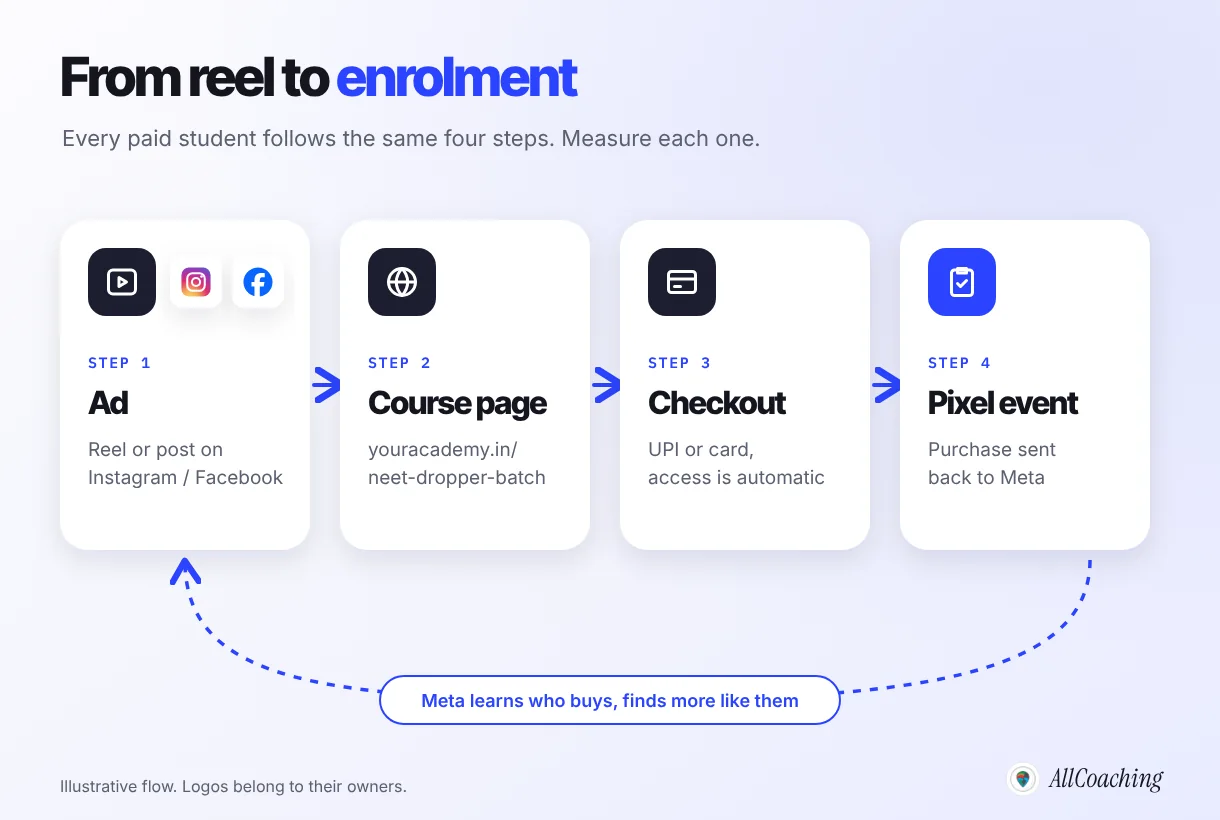
The diagram is the whole idea of this guide. An ad is only the first step. The course page, the checkout and the tracking decide whether the money you spend turns into students, and whether Meta's system can learn who your buyers are.
Meta ads vs boosting a post
Boosting a post is the quick version and is fine for testing whether a reel catches attention. A campaign built in Ads Manager adds what this guide relies on: the objective, the optimisation event, custom audiences and proper reporting. For enrolments rather than views, use Ads Manager.
Do Facebook and Instagram ads work for coaching classes?
Yes, when the offer is clear, the course page is trustworthy and the educator already has proof of good teaching, such as free lessons, student reviews or a demo class. Ads multiply what is already working. They rarely rescue a course nobody has asked for.
Ads work well for coaching when:
- There is a clear deadline, such as a NEET 2027 dropper batch starting on a fixed date or SSC CGL mains revision before the exam.
- You can show teaching in the ad itself: a two-minute concept, a trick, a solved previous-year question.
- The price is visible and the next step is simple: a course page with a pay button, or a short form for a counselling call.
They disappoint when the ad points to a WhatsApp number with no page, or the budget changes daily before Meta has learned anything. In our conversations with educators setting up their academies, the story we hear most often is the same: ads were boosted, comments and DMs came in, and nobody could say how many of them paid. Fixing that measurement problem is half of this guide.
Meta ads also sit alongside your other channels rather than replacing them. Search brings students who are already looking; our SEO guide for online academies covers that side. For the full marketing mix, see digital marketing for coaching institutes in India.
What to set up before your first Meta ad
Before spending a rupee, set up five things: a Facebook Page and Instagram professional account for the institute, an ad account in rupees, your GST details, a course page on your own domain, and Meta Pixel on that site. Skipping any of them makes the first campaign harder to read.
- Facebook Page and Instagram account. Ads run in the name of a Page, and Instagram placements use the linked Instagram account. Use your institute's name and logo on both so the ad looks like the academy the student will land on.
- Ad account with India as the business country. Meta says ads for accounts with India as the business country are sold by Meta India, billed in rupees and subject to GST and tax deducted at source (TDS).[16]
- GSTIN, if you have one. Meta notes that entering a GSTIN is not mandatory, but registered businesses that want input tax credit should add it in payment settings.[16] Ask your accountant how this applies to you.
- A course page on your own domain. One page per course or batch, with the syllabus, the teacher, the schedule, the price, a demo lesson and one pay button. Our guide on how to create a landing page for an online course walks through each part.
- Meta Pixel on that website. The Pixel is the code that tells Meta when someone viewed the course, started checkout or paid. Without it, the Sales objective cannot optimise for purchases and you cannot retarget site visitors.
This is where an academy on your own domain matters. Every AllCoaching plan lets you connect your own domain and add Meta Pixel and Google Tag Manager to your academy, so the page in your ad, the UPI checkout and the tracking all sit on one site you control. A course listed only inside someone else's app usually cannot carry your Pixel at all.
Which campaign objective should a coaching institute choose?
Choose the objective that matches the result you will pay for: Sales if students can buy on your website, Leads if your batch needs a counselling call first. Meta's Ads Manager offers six objectives: Awareness, Traffic, Engagement, Leads, App promotion and Sales.[1]
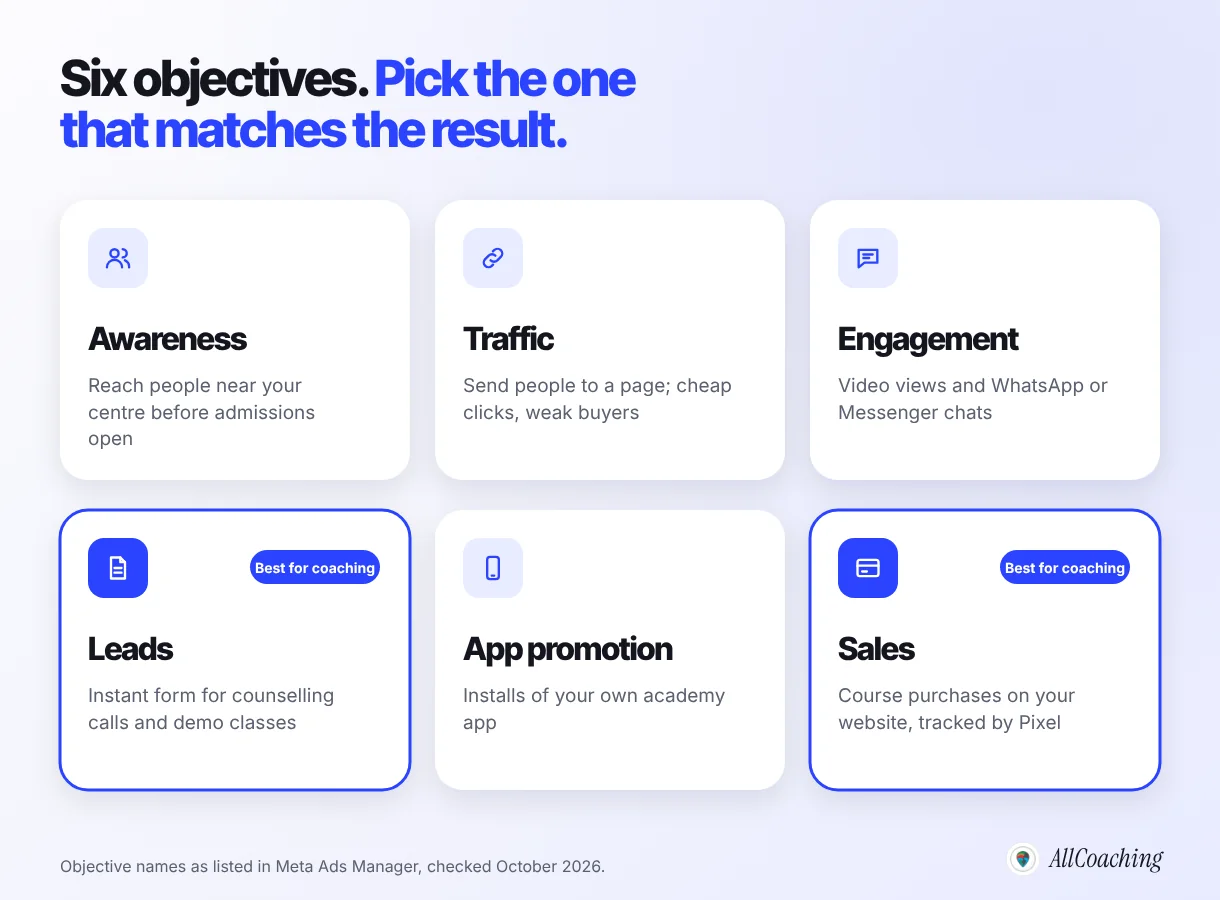
| Objective | What Meta optimises for | Use it for |
|---|---|---|
| Awareness | Reaching the most people likely to remember the ad | Announcing a new offline centre in your city before admissions |
| Traffic | Sending people to a website, app or chat | Rarely the right choice for paid courses: clicks are cheap, buyers are not |
| Engagement | Messages, video views, calls and other actions on the ad | Building a warm audience of people who watched your demo reel |
| Leads | Sign-ups through instant forms, messages or calls | Exam batches with counselling calls, offline admissions, scholarship tests |
| App promotion | Installs or actions in a mobile app | Promoting your own academy app once the website sells well |
| Sales | People likely to purchase on your website, app or WhatsApp | Recorded courses, test series and batches students can buy online |
Leads with instant forms
Instant forms let people share their details without leaving Facebook or Instagram. Meta's form types include "More volume" (the default) and "Higher intent", and you can add custom questions, conditional logic and phone number verification by OTP; a privacy policy link is required.[12] For a NEET or JEE batch, ask two qualifying questions, such as target year and preferred mode (online or centre), and call back the same day.
Is education a special ad category?
No. Meta's special ad categories are housing, employment, financial products and services, and social issues, elections or politics.[2] Coaching ads normally fall outside them. Two edge cases are worth knowing: Meta lists "professional certification programs" and "guaranteed interviews or career placement" as examples of employment ads, and the declaration requirement applies to advertisers in the US or to audiences in the US, Canada and listed European countries.[2] A course sold in India with a "job guaranteed" promise is a bad idea anyway; see the creative section.
How to structure a campaign: exam batch vs skill course
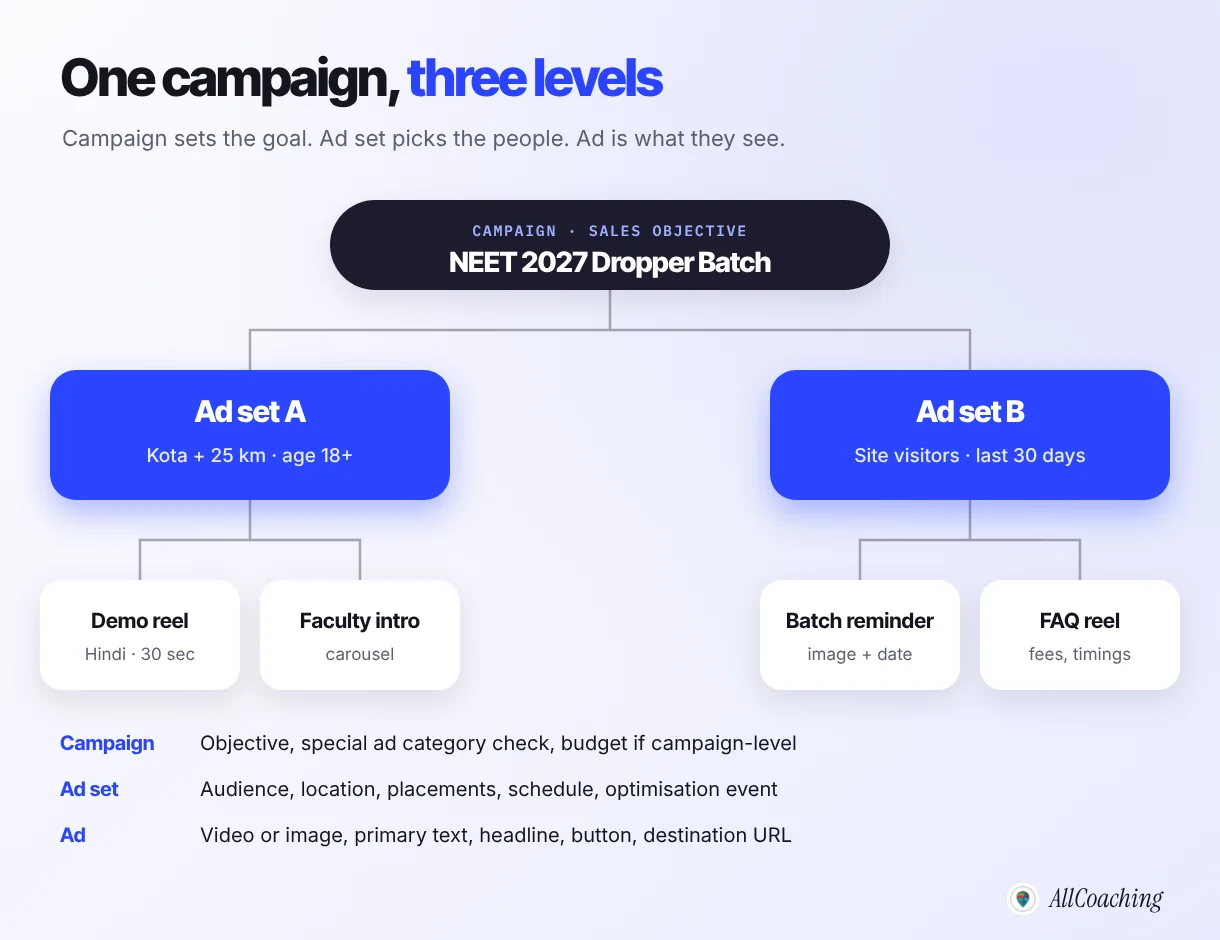
Every Meta campaign has three levels: the campaign holds the objective, the ad set holds the audience, budget and schedule, and the ad holds the video, text and link. Keep the structure small. One campaign per course, one or two ad sets, two to four ads each, is enough for most institutes.
The bigger decision is whether you are selling an exam batch or a skill course, because the buyer, the timing and the right objective change.
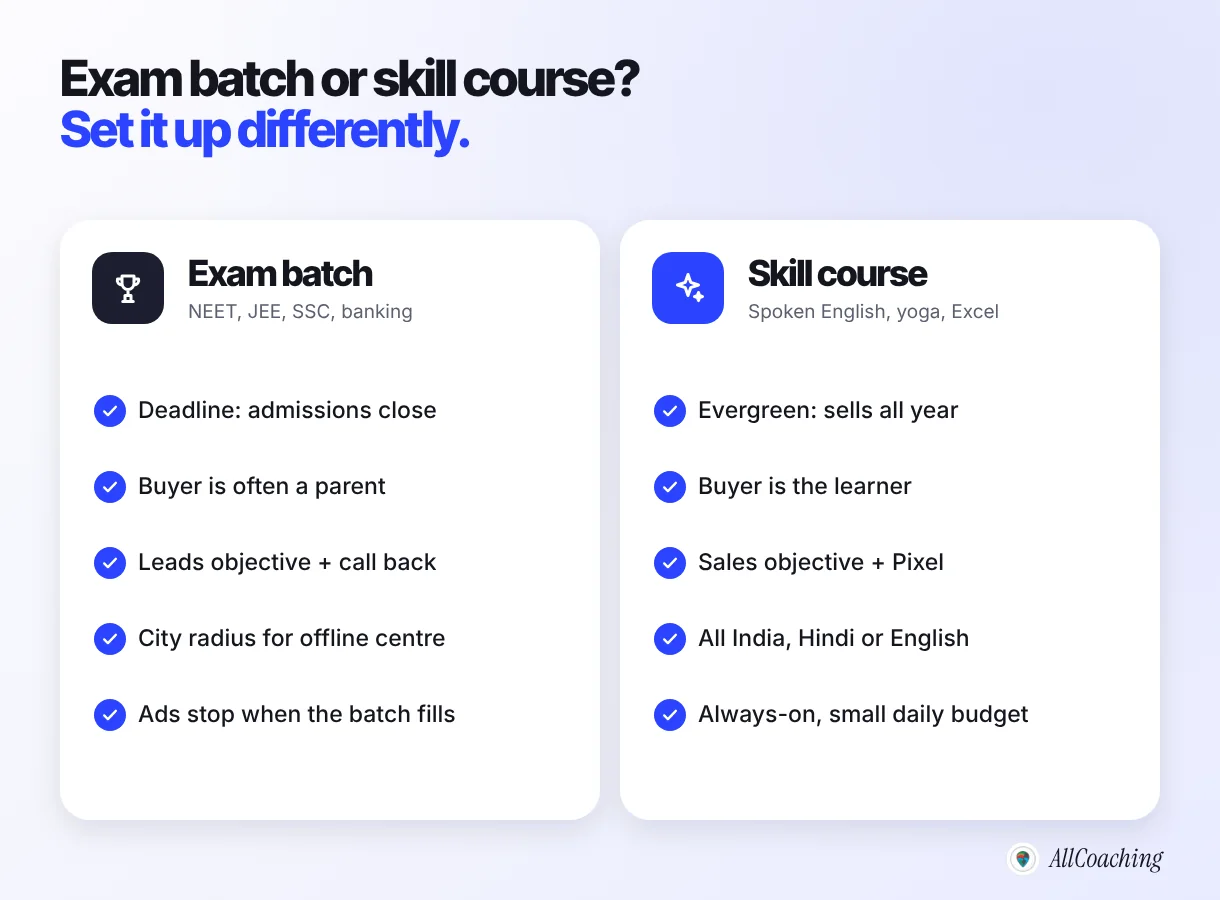
Example 1: NEET 2027 dropper batch (offline centre plus online)
- Objective: Leads with an instant form if admissions need a call; Sales if the batch can be bought online.
- Ad set A: your city plus a radius around the centre, minimum age 18, speaking to droppers and parents.
- Ad set B: people who visited the batch page in the last 30 days (only for audiences aged 18 and over).
- Ads: a Hindi demo reel on one high-weightage topic, a faculty introduction, a reminder with the start date and fee.
Example 2: spoken English course for working adults
- Objective: Sales, optimised for purchases once the Pixel records enough of them.
- Ad set: all of India, age 18 and over, Advantage+ audience with interests such as English language as suggestions.
- Ads: a reel fixing one common mistake ("I am having two brothers"), a student review with permission, a reel showing a live class.
- Budget: a small daily amount that runs all year, adjusted slowly.
Audience ideas for coaching ads
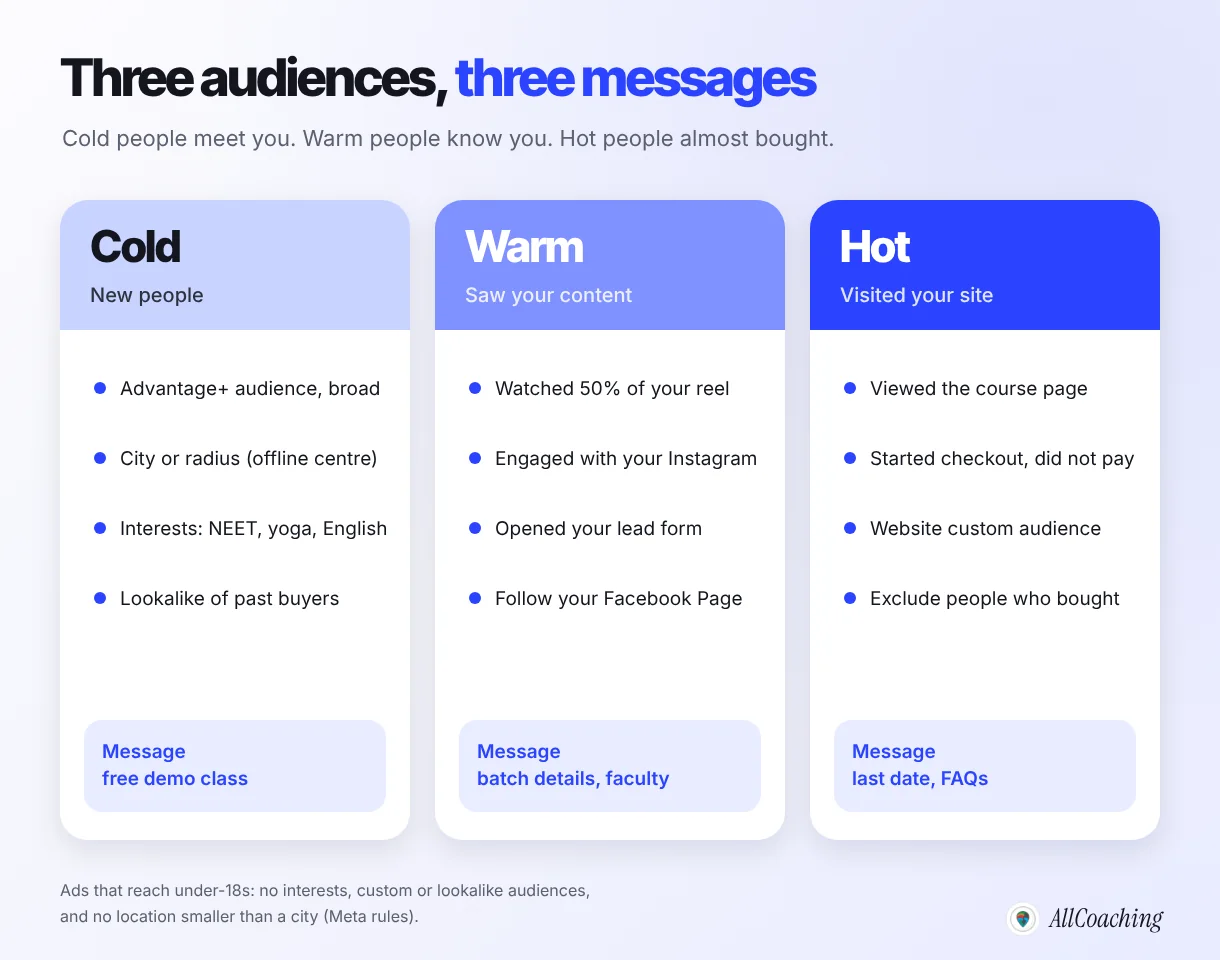
Think in three audiences: cold people who have never heard of you, warm people who watched or engaged with your content, and hot people who visited your course page but did not pay. Each needs a different message, and each is built differently in Ads Manager.
Cold: location, Advantage+ and interests
For an offline centre, location is your strongest filter. Meta lets you choose a city and adjust a radius around it, or choose "current city only".[4] Meta also notes that a city or region selection may have "Reach more people likely to respond" ticked by default; untick it if you only want people in that city.[4] A centre in Kota, Patna or Prayagraj can start with the city plus a radius students actually travel.
For online courses, start broad. Meta applies Advantage+ audience automatically when it is available, and says it typically gets better results than the original audience options because delivery is not limited to people who match your selections.[5] Use location, minimum age and language as hard controls, and add interests such as NEET, yoga or English language as suggestions rather than limits.
Warm and hot: custom audiences from your own data
Meta lets you build custom audiences from people who watched your videos, opened or submitted your lead form, engaged with your Instagram account or Facebook Page, or visited your website, tracked through Meta Pixel.[6] Meta's own example of retargeting is reaching people who visited your website in the last 30 days but have not converted yet.[7] Note that a website custom audience starts filling from the day you create it and does not backfill, so create it the day the Pixel goes live.[7]
Lookalikes of your buyers
Once you have a list of past students or a Pixel audience of purchasers, Meta can build a lookalike audience of people similar to them.[6] Exclude people who already bought so they do not keep seeing the sales ad.
Students under 18: a rule every NEET and JEE educator must know
Class 11 and 12 students are often under 18, and Meta limits ads that reach them. For audiences that include teens, Meta lists gender, locations smaller than cities (custom radius or pin drop), detailed targeting (interests, behaviours and demographics), language, website custom audiences, customer list audiences, engagement audiences and lookalike audiences as unavailable worldwide.[3] Optimisation goals such as leads and landing page views are also unavailable for teen audiences.[3]
In practice: if you want radius targeting, interests, retargeting or lead forms, set the minimum age to 18 and speak to parents and droppers. Meta also notes that with Advantage+ audience you cannot select ages under 18.[5] If you do want to reach school students directly, keep a separate ad set with age and city-level location only, and send them to free content rather than a hard sale.
Ad creatives that work for coaching: reels, Hindi and demo classes
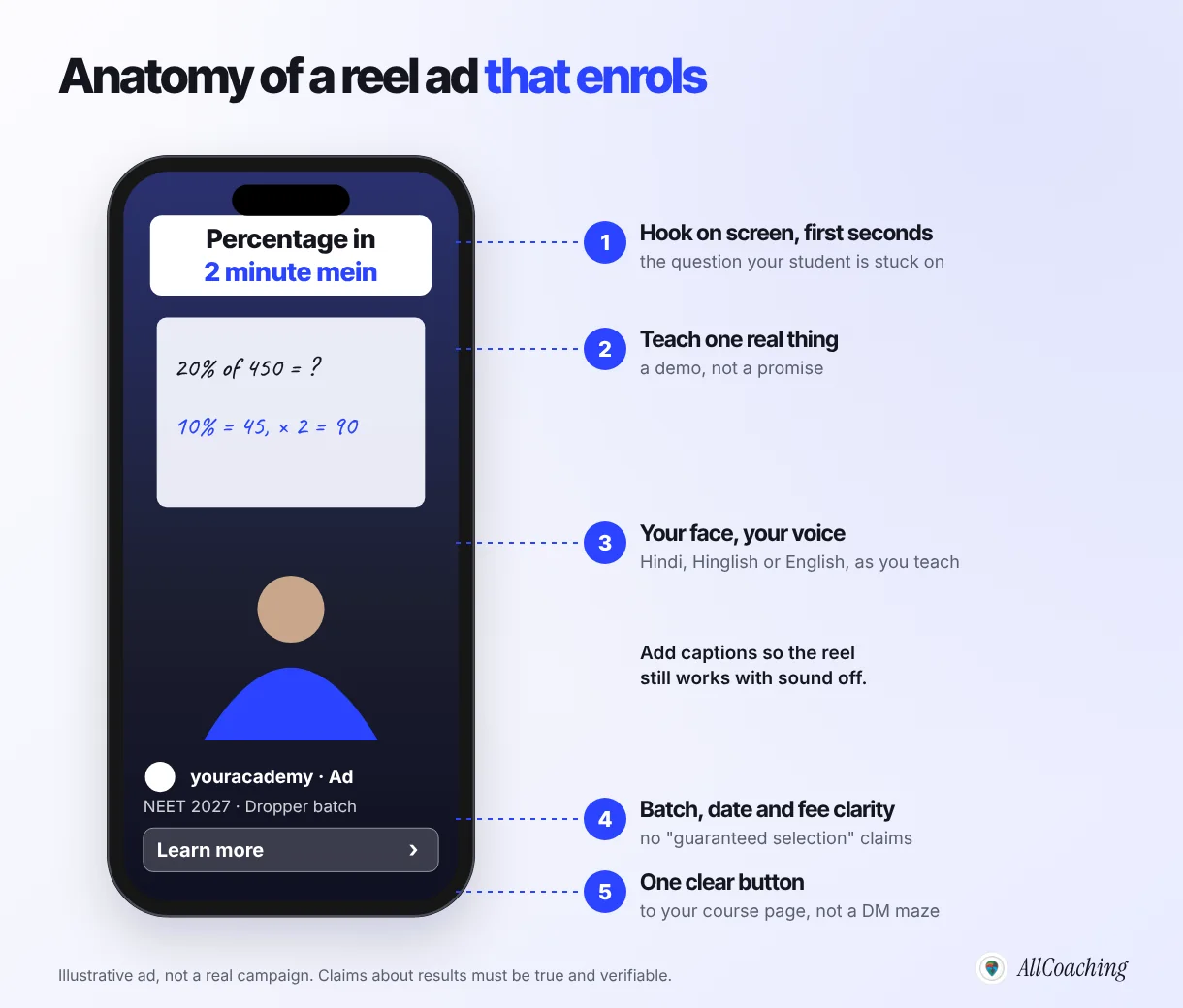
The best coaching ad is a short lesson: a vertical reel where you teach one useful thing in your own voice, in the language your students study in, and end with a clear next step. Students and parents are not buying an institute logo. They are buying a teacher they trust.
Creative ideas by course type
- Demo class reel: 30 to 60 seconds solving one previous-year question, such as a NEET genetics problem or an SSC percentage trick.
- Hindi and regional creatives: if you teach in Hindi, advertise in Hindi. A Hinglish hook on screen ("Percentage 2 minute mein") with Hindi speech matches how your class actually sounds. Make one version per language rather than mixing.
- Batch details reel: start date, timings, mode, fee and what is included. Use it to retarget warm audiences.
- Skill courses: spoken English (one common mistake fixed), yoga (one posture for back pain taught safely), Excel (one formula that saves time).
Add on-screen captions so the reel still works with sound off, and keep the first frame about the student's problem, not your logo. Our guide to Instagram reels for educators covers making reels that also grow organically.
Topper and result claims: what is allowed
Results are the strongest proof a coaching institute has, and the easiest place to get an ad rejected or to mislead a family. Meta's advertising policy checklist says ads must accurately represent the product and must not "make potentially misleading claims or set unrealistic expectations", or use sensationalised or exaggerated language.[9] So:
Do
Name a real student's real result only with their written consent and proof you can show if asked, for example "Riya, our 2025 dropper student, scored 640 in NEET", if that is exactly what happened. Describe what the course includes. Say "join the demo class" or "see the syllabus".
Avoid
"Selection guaranteed", "100% result", "AIR under 1000 pakka", other institutes' toppers, rank numbers you cannot prove, before-and-after marksheets that imply every student will get the same score.
The personal attributes rule
Meta does not allow ads that "assert or imply the personal attributes of the viewer", and its list includes age, family status, physical or mental health and vulnerable financial status.[8] Meta notes that "you" and "your" are fine as long as the ad does not mention a prohibited attribute.[8] For coaching ads, write about the course, not about the viewer: "NEET 2027 dropper batch: details for students and parents" works; "Are you a worried parent?" or "Failed NEET again?" asserts something about the person watching.
Send ads to a course page on your own domain
Send every ad to a course page on your own academy domain, not to a WhatsApp number, a Linktree or a generic home page. The page is where the student decides, where the payment happens, and where Meta Pixel records the result.
A good course page repeats the ad's promise above the fold, then shows a demo lesson, the teacher, syllabus, schedule, price and one button, and loads fast on a budget Android phone. Meta's own quality guidance lists landing pages that lack original content, push pop-ups or misrepresent the product as low-quality landing page experiences, and says repeated low-quality ads can make an advertiser's ads less competitive in auctions.[18]
Pricing matters as much as the page. If the course is priced too low, ads can never pay for themselves; if it is unclear, people leave. Our guide on how to price an online course in India helps you set a price with room for ad costs. For the checkout itself, compare options in UPI payment gateways for course sellers.
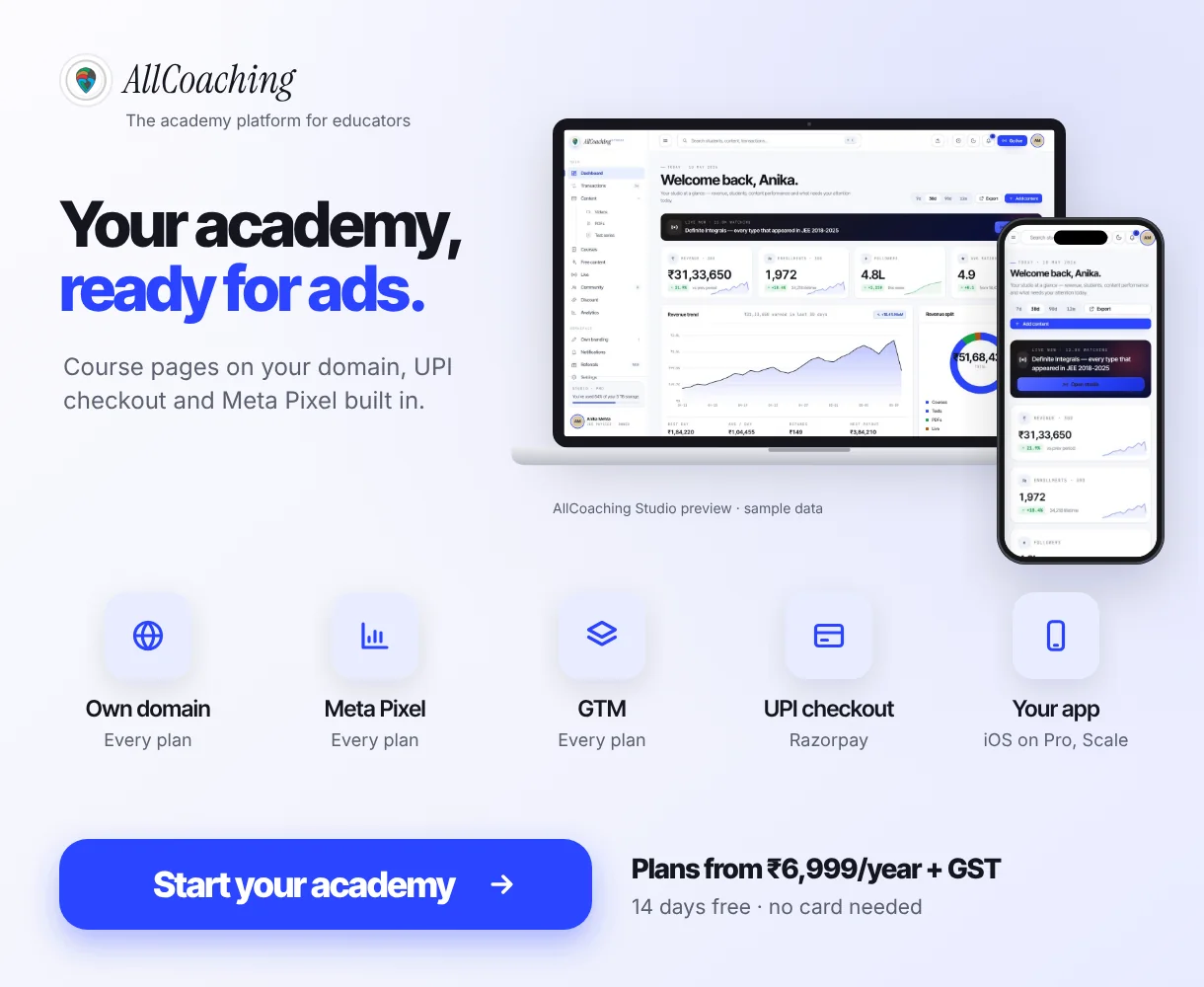
With AllCoaching you build that page yourself: sign up, choose a plan, upload your course, connect your domain and start selling, with UPI and card checkout and automatic Razorpay payouts running underneath. Every plan includes your own white-label Android app as well, and the iOS app is on Pro and Scale. If you want to understand why the domain matters for trust and tracking, read LMS with a custom domain for coaching.
Build your own academy. Try it free for 14 days.
Website on your own domain, your own Android app (iOS app on Pro and Scale), unlimited live classes and UPI checkout on every plan. Plans from ₹6,999 a year after the trial (excl. GST).
No card needed · Cancel anytime in the trial · Your data stays exportableTrack enrolments with Meta Pixel and Conversions API
Meta Pixel is a piece of code on your website that sends events, such as a page view, a checkout started or a purchase, back to Meta so you can measure results, optimise delivery and build audiences. For a coaching website, four standard events cover almost everything.
| Standard event | Meta's description | Where it fires on a course site |
|---|---|---|
| ViewContent | A visit to a web page you care about | Course or batch page |
| InitiateCheckout | The start of a checkout process | Click on "Enrol now" or "Buy course" |
| Purchase | Completion of a purchase, usually a confirmation or thank-you page | Payment success page, with value and currency (INR) |
| Lead | A submission of information, such as a form or a trial sign-up | Demo class or counselling form |
Those definitions come from Meta's list of Pixel standard events, which also includes CompleteRegistration, StartTrial and SubmitApplication; Meta's own example for SubmitApplication is an application for an educational program.[10] The PageView event is part of the base Pixel code and fires on every page.[10]
How to check the Pixel is working
- Add your Pixel ID (or your Google Tag Manager container) to your academy website.
- Open Events Manager, use the Test events tool, and visit your course page from your phone.
- Do a real low-value test purchase or use a test coupon if your checkout allows it, and confirm Purchase arrives once, with the right value.
- Create a website custom audience the same day, because it does not backfill.[7]
Pixel plus Conversions API
The Conversions API sends the same events from a server instead of the browser. Meta explains that the Pixel relies on browser data, which can be blocked or lost, while the Conversions API is more resilient to browser limits and ad blockers.[11] If you send the same event from both, Meta deduplicates it when the event name and event ID match.[11] Most new academies can start with the Pixel alone.
How much do Facebook ads cost for coaching in India?
There is no fixed price for a Facebook or Instagram ad in India. You set a daily or lifetime budget, Meta runs an auction, and what you pay per lead or enrolment depends on your city, subject, season, creative and page.
What Meta actually says about budgets
- Minimums vary. Meta requires a minimum budget per campaign or ad set, which depends on things like vertical, currency, bid strategy and schedule; Ads Manager shows an alert if your budget is below it.[13]
- Daily budgets flex. On a good day Meta may spend up to 75% more than your daily budget, but not more than seven times the daily budget over a calendar week.[14]
- Harder events need more budget. Meta notes that optimising for purchases may need more budget than optimising for landing page views.[13]
- Learning takes results. Meta suggests waiting until an ad set has around 50 optimisation events before judging its cost, and calls an ad set "learning limited" when it is unlikely to get about 50 in the week after a significant edit.[15]
GST and TDS on Meta ads in India
For ad accounts with India as the business country, Meta adds GST and TDS whenever you are charged; the amount charged includes TDS, which you still deposit with the government.[16] Meta states the TDS rate for advertising as 2% and refunds it as ad credit once you submit the TDS certificate.[17] Meta's pages do not state the GST rate, so read it from your invoice and plan your budget with GST on top.
An illustrative four-week test
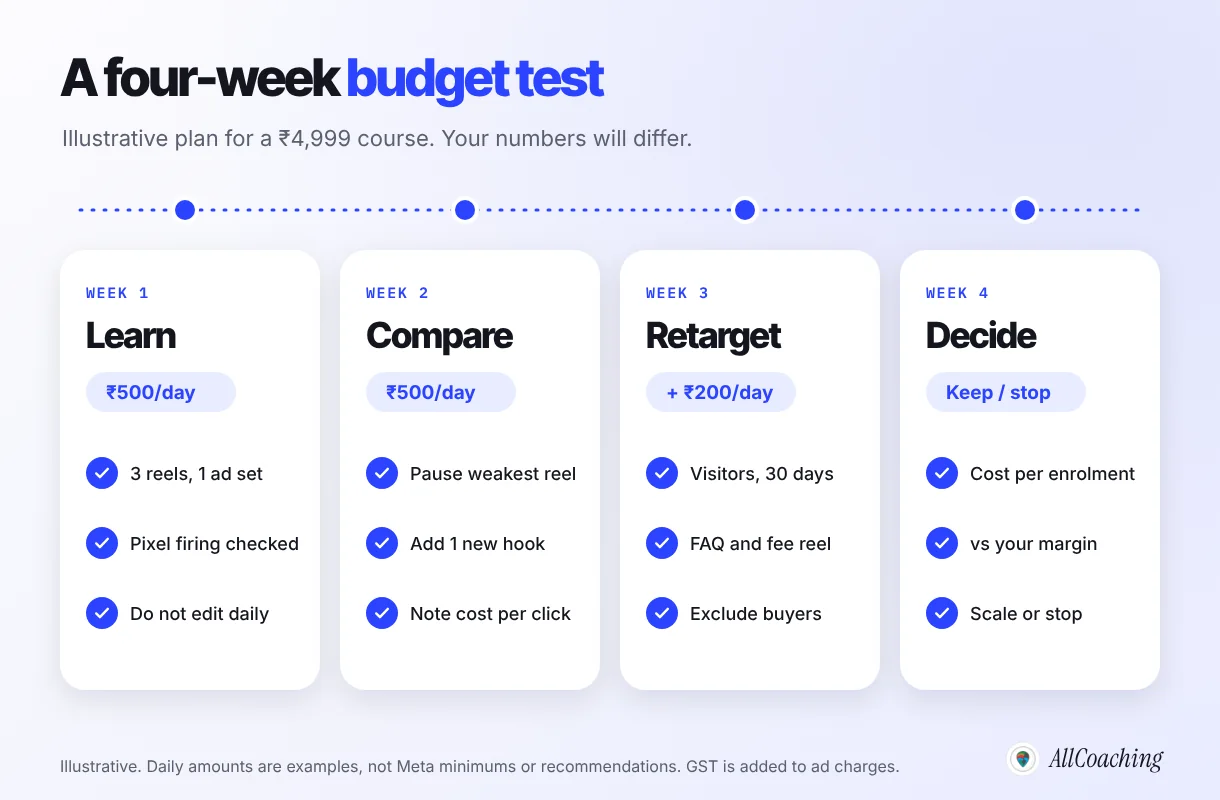
Decide the total test budget first, as an amount you can afford to spend while learning, then follow the four weeks in the graphic without editing the ads in week one. If the ad set cannot reach enough purchases to learn, optimise for an earlier step such as InitiateCheckout, which Meta itself suggests for learning-limited ad sets.[15]
Question educators ask
Should I run ads with a ₹200 a day budget?
You can, and Ads Manager will tell you if it is below the minimum for your settings. The risk is not the amount but the learning: at a small budget an ad set may never collect enough purchases to optimise. Start with a cheaper event (lead or checkout started), one ad set, and give it a full week before judging.
How to measure cost per enrolment
Cost per enrolment is your total ad spend for a period divided by the number of paid enrolments from those ads in the same period. It is the one number that tells you whether ads are making or losing money, and it matters more than cost per click, cost per lead or reach.
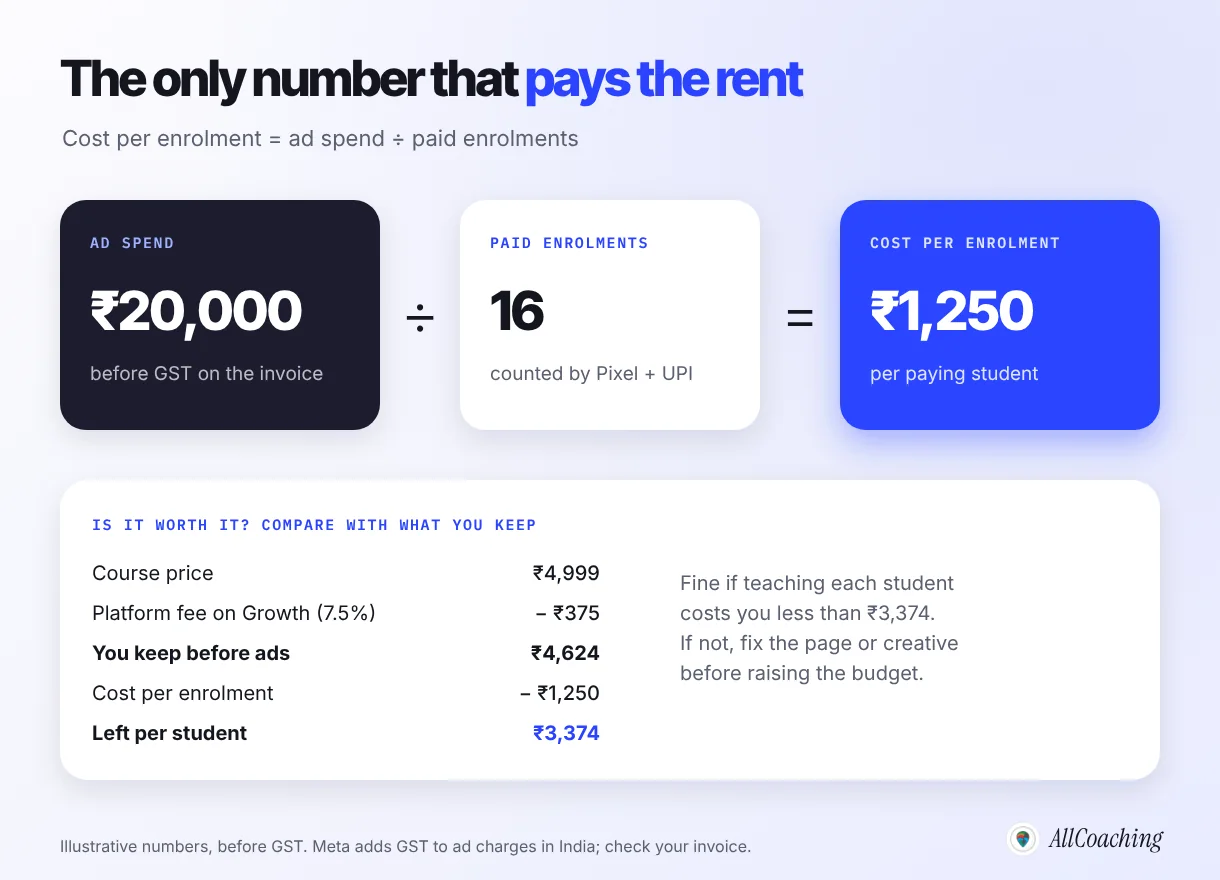
In the illustrative example, ₹20,000 of ad spend brought 16 paid enrolments, so each enrolment cost ₹1,250 before GST. On a ₹4,999 course sold on AllCoaching's Growth plan (7.5% platform fee), the educator keeps about ₹4,624 per sale before ad costs, leaving about ₹3,374 per student after the ad cost. Whether that is good depends on what it costs you to teach each student and on how many of them come back for the next course.
Three habits keep the number honest:
- Count enrolments from your own records. Match Ads Manager's Purchase count against the payments in your studio. Some buyers see an ad on Instagram and pay days later from a WhatsApp link.
- For lead campaigns, track two rates. Cost per lead, and the share of leads that pay. A cheap lead form that nobody converts is expensive.
Paid ads also bring students you can keep. Move every buyer into your WhatsApp channel and course updates so the next batch costs less to fill.
Step by step: launch your first Meta ad campaign for a coaching course
Here is the full sequence, from an empty ad account to a campaign you can judge on cost per enrolment. Most educators can complete the setup in a day and the test in four weeks.
- Set up the accountsCreate or connect your institute's Facebook Page and Instagram professional account, an ad account with India as the business country, a payment method, and your GSTIN if you have one.
- Build one course page on your own domainPromise, demo lesson, teacher, syllabus, schedule, price and one pay button, loading fast on a budget Android phone.
- Install Meta Pixel and test eventsAdd the Pixel or Google Tag Manager, fire ViewContent, InitiateCheckout and Purchase, check them in the Test events tool, and create a website custom audience the same day.
- Choose the objectiveSales if students can buy on the website, Leads with an instant form if the batch needs a counselling call.
- Define the audienceCity and radius for an offline centre, all India for online courses, minimum age 18 when you need interests, retargeting or lead forms.
- Make three reel adsOne demo lesson, one faculty introduction, one batch details reel, in the language you teach in, with captions and no guaranteed-result claims.
- Run an illustrative four-week testPick a test budget you can afford, leave the ads unedited for the first week, then pause the weakest ad and add retargeting.
- Measure cost per enrolment and decideDivide spend (with GST) by paid enrolments from your own records, compare with what you keep per sale, then scale slowly or stop.
If you are still building the course itself, start with how to sell courses online in India and come back to ads once the first few students have bought without them.
Common Meta ads mistakes coaching institutes make
The most expensive mistakes are about measurement and claims, not about the ad design. These are the ones to fix first.
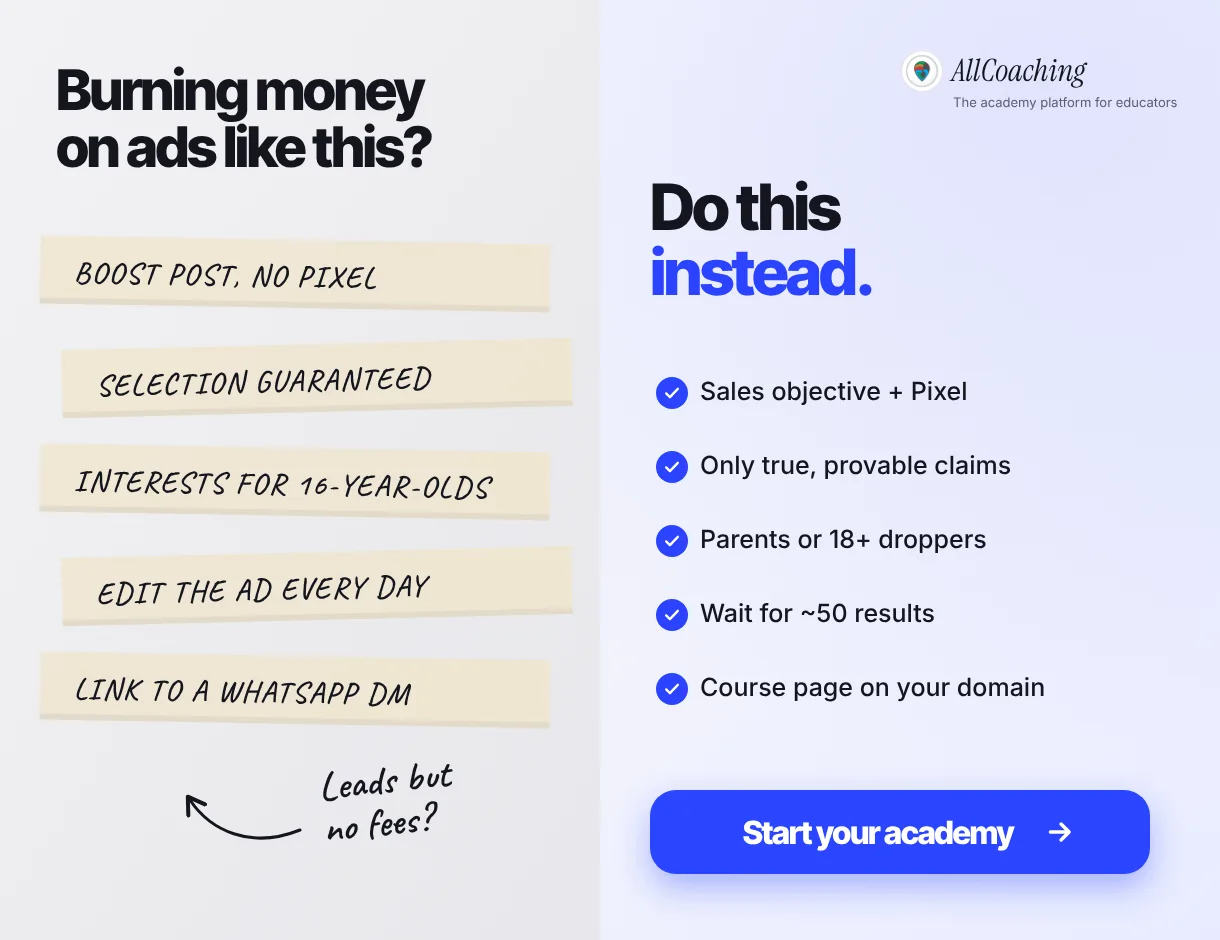
- Boosting posts with no Pixel: views and comments, but no record of who paid.
- Guaranteed selection or rank claims: misleading, and against Meta's policy on unrealistic expectations.
- Interest targeting for school students: not allowed for audiences that include under-18s.
- Editing every day: significant edits restart learning.
- Sending ads to a WhatsApp DM: a course page with a pay button converts and measures better.
- Judging by cost per lead alone: track how many leads pay.
- Forgetting GST: plan with GST on top of your Ads Manager budget.
Glossary
- Meta Ads Manager
- Meta's tool for creating, running and measuring ads on Facebook, Instagram, Messenger, WhatsApp and Audience Network.
- Campaign objective
- The result you ask Meta to deliver for a campaign: Awareness, Traffic, Engagement, Leads, App promotion or Sales.
- Ad set
- The middle level of a Meta campaign that holds the audience, placements, budget, schedule and optimisation event.
- Meta Pixel
- Code on a website that sends events such as page views, checkouts and purchases to Meta for measurement, optimisation and audiences.
- Conversions API
- A server-side way to send the same website events to Meta, more resilient to browser limits and ad blockers than the Pixel alone.
- Custom audience
- An audience built from your own data or engagement, such as course page visitors, video viewers or lead form openers.
- Lookalike audience
- An audience of people similar to a source custom audience, such as past students who paid.
- Learning phase
- The period after a new ad set or significant edit while Meta's delivery system learns; Meta suggests judging costs after about 50 optimisation events.
- Cost per enrolment
- Total ad spend divided by the number of paid enrolments those ads produced in the same period.
Frequently asked questions
Do Meta ads work for coaching institutes in India?
Yes, when the ad teaches something real, points to a clear course page on your own domain and is measured by paid enrolments through Meta Pixel. They work best for batches with a clear start date and for courses that already sell organically.
Which Meta ad objective is best for coaching classes?
Use Sales if students can pay on your website, so Meta optimises for purchases tracked by the Pixel. Use Leads with an instant form if admissions need a counselling call. Traffic and Engagement rarely fit paid courses as the main objective.
Is education a special ad category on Meta?
No. Meta's special ad categories are housing, employment, financial products and services, and social issues, elections or politics. Meta does list professional certification programs and guaranteed career placement as employment examples, with declaration rules mainly for US, Canadian and some European audiences.
Can I target school students under 18 with Meta ads?
Only with limited options. For audiences that include teens, Meta does not allow interests, custom or lookalike audiences, language or locations smaller than a city, and some goals such as leads are unavailable. Most NEET and JEE institutes target parents and 18+ droppers instead.
How much do Facebook ads cost for a coaching institute in India?
There is no fixed price. You set a budget, Meta runs an auction, and cost per enrolment depends on your city, subject, season, creative and page. Ads Manager shows the minimum for your settings, and GST is added to ad charges for Indian accounts.
Is GST charged on Facebook and Instagram ads in India?
Yes. For ad accounts with India as the business country, Meta says ads are sold by Meta India, billed in rupees and subject to GST and TDS. Meta states the TDS rate for advertising as 2 percent and refunds it as ad credit once you submit the certificate.
Can I show topper results in my coaching ads?
Only true results you can prove, shared with the student's written consent. Meta's policy checklist rules out misleading claims and unrealistic expectations, so avoid guaranteed selection, 100 percent result or rank promises.
What is Meta Pixel and why does a coaching website need it?
Meta Pixel is code on your website that sends events such as course page views, checkouts started and purchases to Meta. It lets the Sales objective optimise for real buyers, lets you retarget course page visitors and shows your cost per enrolment.
Should my ads go to WhatsApp or to a course page?
Send most ads to a course page on your own domain with the price and a pay button, so the Pixel can record enrolments. Use WhatsApp for questions and for keeping students after they buy.
Does AllCoaching support Meta Pixel?
Yes. Every AllCoaching plan lets you connect your own domain and add Meta Pixel and Google Tag Manager to your academy. Plans start at ₹6,999 a year plus GST after a 14-day free trial with no card needed.
Sources
- Meta Business Help Centre, "How to choose the right ad objective in Meta Ads Manager". facebook.com/business/help/1438417719786914 (checked October 2026).
- Meta Business Help Centre, "About ads for housing, employment or financial products and services". facebook.com/business/help/399587795372584 (checked October 2026).
- Meta Business Help Centre, "About advertising to teens". facebook.com/business/help/229435355723442 (checked October 2026).
- Meta Business Help Centre, "Use location targeting". facebook.com/business/help/365561350785642 (checked October 2026).
- Meta Business Help Centre, "How to create a campaign using Advantage+ audience". facebook.com/business/help/793748385630490 (checked October 2026).
- Meta Business Help Centre, "About custom audiences". facebook.com/business/help/744354708981227 (checked October 2026).
- Meta Business Help Centre, "About website custom audiences". facebook.com/business/help/610516375684216 (checked October 2026).
- Meta Business Help Centre, "About Meta's privacy violations and personal attributes advertising policy". facebook.com/business/help/2557868957763449 (checked October 2026).
- Meta Business Help Centre, "Advertising policy basics checklist". facebook.com/business/help/757209948405699 (checked October 2026).
- Meta Business Help Centre, "Specifications for Meta Pixel standard events". facebook.com/business/help/402791146561655 (checked October 2026).
- Meta Business Help Centre, "About deduplication for Meta Pixel and Conversions API events". facebook.com/business/help/823677331451951 (checked October 2026).
- Meta Business Help Centre, "About lead ads with instant form". facebook.com/business/help/761812391313386 (checked October 2026).
- Meta Business Help Centre, "Best practices for minimum budgets". facebook.com/business/help/203183363050448 (checked October 2026).
- Meta Business Help Centre, "About daily budgets". facebook.com/business/help/190490051321426 (checked October 2026).
- Meta Business Help Centre, "About learning limited". facebook.com/business/help/269269737396981 (checked October 2026).
- Meta Business Help Centre, "About India's Goods and Services Tax". facebook.com/business/help/1273346946097087 (checked October 2026).
- Meta Business Help Centre, "About tax deducted at source (TDS) refunds for India". facebook.com/business/help/571983419976170 (checked October 2026).
- Meta Business Help Centre, "Best practices to improve ad quality and performance". facebook.com/business/help/1767120243598011 (checked October 2026).
Amit builds AllCoaching, the academy platform Indian educators set up themselves: their own website on their own domain, their own app, and the tools to grow it. This guide walks through Meta ads step by step, with every Meta policy and figure linked to its official source.