
On this page
Start your online academy today. 14 days free.
Start free trialTo create an online course in India, choose one clear outcome for one group of students, split the syllabus into modules of 5–15 minute lessons, record them on your phone with a clip-on mic, add PDF notes and a test to every module, offer one free demo lesson, and test the whole course with 5–10 students before you sell it. You do not need a studio, an editor or a developer to do any of this.
Maybe you teach NEET biology to a batch of thirty in Kota or Patna and want students from other cities to learn from you. Maybe you teach SSC maths in Hindi on YouTube, spoken English to working adults on Zoom, yoga to a morning group, or classical vocal music on weekends. You already know how to teach. What feels new is turning that teaching into a course: something a student can buy, open on a phone and finish without you in the room.
This guide covers the whole build, in order: picking the topic and outcome, structuring modules and lessons, choosing between video, PDF, tests and live classes, a recording setup on a budget, teaching on camera, editing with free tools, Hindi and regional medium with captions, the free demo lesson, uploading and organising everything in your academy, the pilot batch and how to keep the course up to date. If you have not set up an academy yet, read how to start an online academy in 5 steps alongside this; that guide covers sign-up, domain and payments, and this one goes deep on the course itself.
Key takeaways
- Start from one outcome, such as "score 300+ in NEET biology" or "speak confidently in a job interview", not from a list of topics.
- Structure the course like a syllabus: 4–8 modules, each made of 5–15 minute video lessons with one idea each, a PDF of notes and a module test.
- Audio matters more than the camera. A phone you already own plus a lapel mic (illustratively ₹500–₹2,000) is enough for a first course.
- Use free tools: OBS Studio records the screen, Shotcut edits video, and YouTube automatic captions support Hindi; review every caption before students see it.
- Host lessons on YouTube as unlisted videos, which only people with the link can watch, and keep a public free lesson on your channel to bring students in.
- Pilot with 5–10 students before launch and fix the top three problems they find.
- On AllCoaching, videos via YouTube and live classes are unlimited on every plan, with PDF notes and test series in the same course, after a 14-day free trial with no card.
How to create an online course in India: the 8 steps
Choose an outcome, outline modules and lessons, pick your formats, set up a budget recording kit, script and record, edit and caption, upload and organise in your academy, then pilot with a small batch. Every section below expands one of these steps.
- Choose the topic and outcomePick a topic you already teach and write one sentence naming the student, the result and the time the course takes.
- Outline modules and lessonsSplit the syllabus into 4–8 modules and each module into 5–15 minute lessons that teach one idea each.
- Pick your formatsPlan video lessons to teach, a PDF of notes and a test for every module, and a weekly live class for doubts.
- Set up a budget recording kitUse your phone, a lapel mic, a tripod and soft light facing you, plus a free screen recorder for slides and problems.
- Script and recordWrite a bullet outline per lesson (hook, idea, examples, practice, recap) and record one module at a time.
- Edit and captionTrim mistakes and pauses with a free editor, export MP4, and review YouTube automatic captions in Hindi or English.
- Upload and organise in your academyUpload videos to YouTube as unlisted, add them to the course in order with PDFs and tests, and mark lesson 1 as a free demo.
- Pilot with 5–10 studentsOpen module 1 to a small batch, collect where they get stuck, fix the top three issues and then launch to everyone.
Most first courses take longer than planned for one reason: the educator records first and plans later. Two weeks of recording later, the lessons are 70 minutes long, out of order, and there is no test anywhere. Planning on paper for one evening saves weeks of re-recording.
When educators build a first course with us, the ones who launch fastest are rarely the ones with the best camera. They are the ones who wrote the module list first, recorded one module at a time, and opened the course to a few students before it felt finished.
How do you choose the topic and outcome for your first online course?
Choose a topic you have already taught to real students, and write the outcome as one sentence a student would say after finishing the course. The outcome decides what goes in and, more importantly, what stays out.
Start from what you already teach
Your first course should be the one you could teach tomorrow without preparing: the chapter you have explained a hundred times, the batch you run every year, the skill students already ask you about. You know where students get stuck, which examples work and which questions come up. That experience is what a student is paying for.
Write the outcome, not the topic
"Biology" is a subject. "NEET biology" is a topic. "Finish the Class 11 human physiology syllabus with chapter tests, in Hindi, in six weeks" is an outcome. Write yours as one sentence that names the student, the result and the time:
- Exam: "SSC CGL aspirants can solve arithmetic questions in under a minute each, in 30 days."
- Exam: "NEET droppers revise the full plant physiology unit with 300 practice questions."
- Skill: "Freshers can answer the ten most common interview questions in clear English."
- Skill: "Beginners can follow a 20-minute morning yoga routine safely at home."
- Skill: "Students can sing five basic ragas with correct sargam."
A sharp outcome makes every later choice easier. If a lesson does not move the student toward it, it goes in a later course. It also gives you the course title and the first line of its description, and it helps you price the online course against what students already pay for that result.
Question educators ask
Should my first course be big or small?
Small. A focused course of 20 to 40 short lessons that you can finish recording in two to four weeks beats a 200-lesson "complete" course that never launches. You can add a second course, a test series or a live batch once the first one sells.
What is a good course structure for an online course?
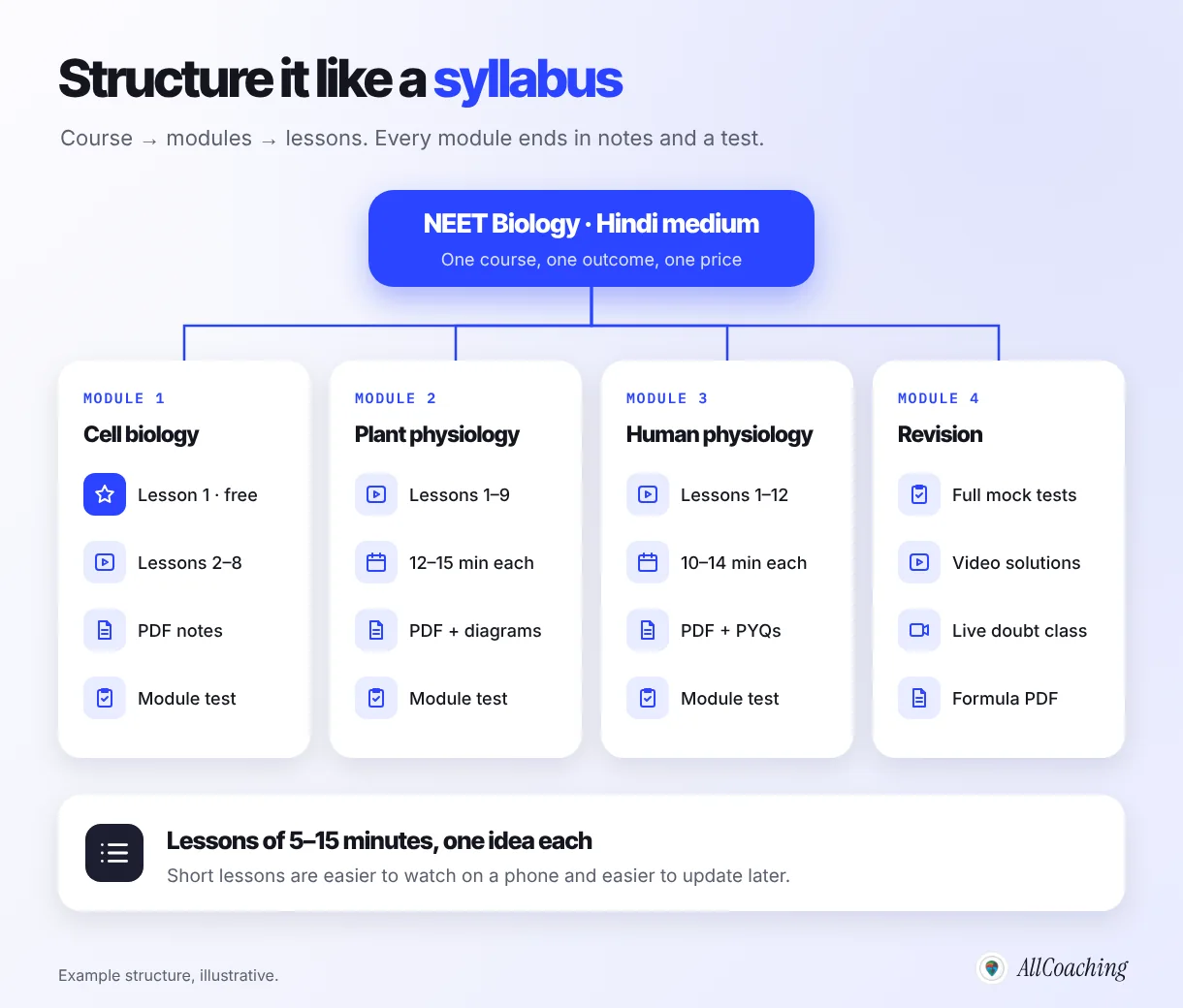
A good online course structure is a course split into 4–8 modules, each module made of short video lessons of 5–15 minutes with one idea each, followed by a PDF of notes and a module test. Students should always know where they are and what comes next.
Modules follow the syllabus
For an exam course, your modules are usually the units of the official syllabus in the order you teach them: number system, percentage, ratio, algebra for SSC maths; cell biology, plant physiology, human physiology for NEET biology. For a skill course, modules follow the order a learner can handle: breathing and posture before asanas, sounds before sentences in spoken English, sargam before ragas.
Lessons of 5–15 minutes
A recorded lesson is not a classroom period. In a 60-minute class you repeat, take questions and wait for the slowest student; on video, a student can pause and replay. Cut each topic into lessons of one idea each. Most land between 5 and 15 minutes. Short lessons are easier to watch on a phone during a commute, easier to find when revising, and much easier to re-record when something changes.
Write the outline before you record
Put the outline in a simple sheet: module, lesson number, lesson title, the one idea it teaches, its length target, the PDF that goes with it, and the test questions it feeds. If you want help drafting the first version from your syllabus, our guide to using ChatGPT for course curriculum design shows how, but always edit the draft with your own teaching order.
| Course | Modules | Lessons (illustrative) | Per module |
|---|---|---|---|
| NEET biology, Hindi medium | 6 units | 45–60 lessons of 10–15 min | Notes PDF, diagram sheet, 30-question test |
| SSC CGL maths | 8 topics | 50–70 lessons of 6–12 min | Formula PDF, practice set, timed test |
| Spoken English for interviews | 5 stages | 25–35 lessons of 5–10 min | Phrase sheet PDF, speaking task, quiz |
| Morning yoga for beginners | 4 weeks | 20–28 lessons of 8–20 min | Routine PDF, safety notes, check-in quiz |
| Hindustani vocal basics | 5 levels | 25–40 lessons of 5–12 min | Sargam PDF, practice audio, recording task |
Videos, PDFs, tests and live classes: which formats does your course need?
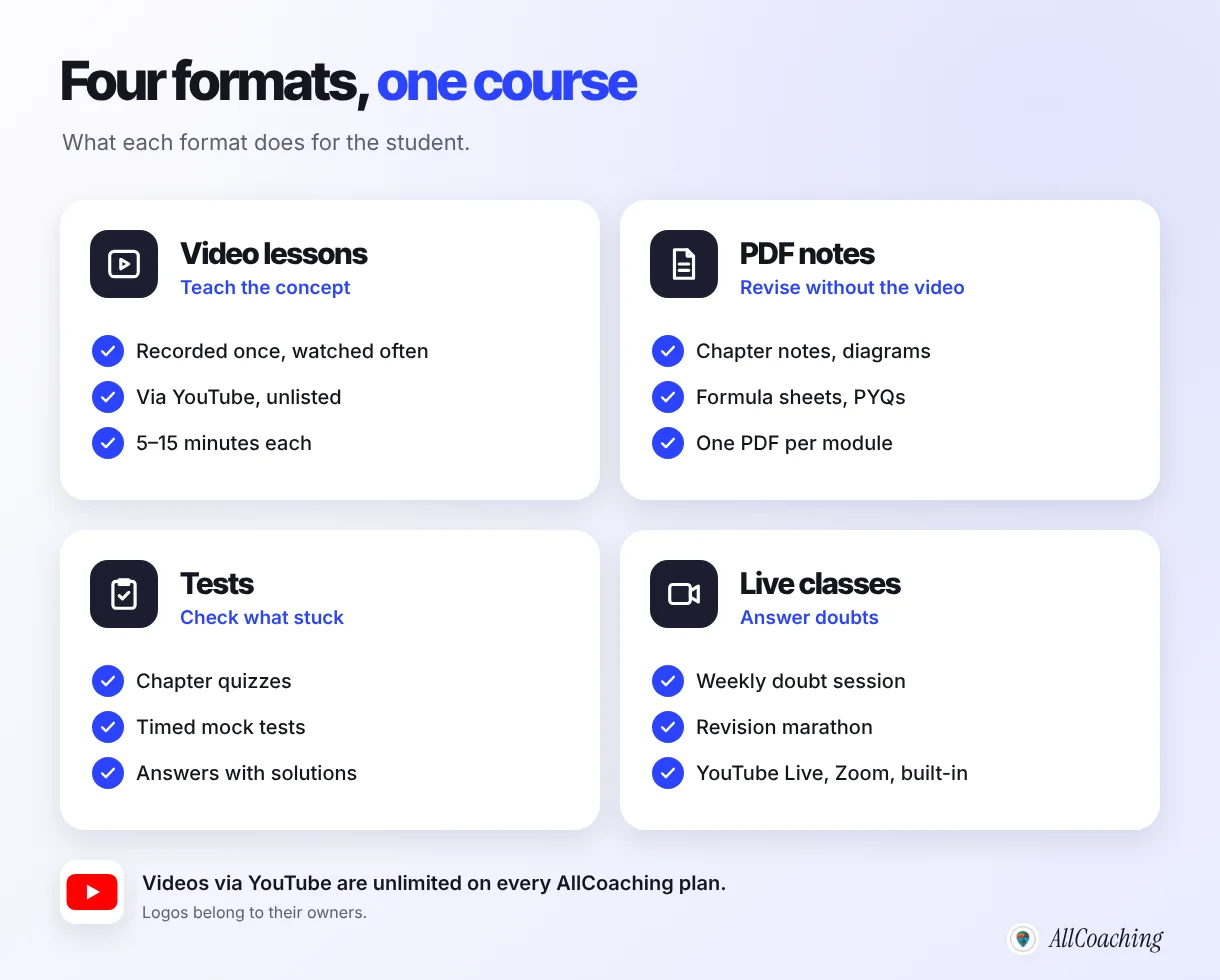
Most Indian online courses work best with four formats together: video lessons to teach, PDF notes to revise, tests to check what stuck, and live classes to answer doubts. Video alone is a playlist; the other three turn it into a course.
Video lessons
Videos carry the teaching. Many Indian educators host lesson videos on YouTube and keep them unlisted. YouTube's help centre says unlisted videos "can be seen and shared by anyone with the link" and won't show up in YouTube's search results unless someone adds them to a public playlist; they also do not appear on your channel's Videos tab.1 That makes them a practical way to host paid lessons, with one caution: anyone who has the link can share it, so treat unlisted as private-ish, not secret.
PDF notes
Students revise from notes, not from replaying a video. Give each module a PDF: chapter notes, labelled diagrams, a formula sheet, previous-year questions or, for skills, a routine or phrase sheet. Make them readable on a 6-inch phone screen: large text, one column, and headings that match the lesson titles.
Tests and quizzes
Tests tell the student, and you, whether the lessons worked. Use a short quiz after each module and, for exam courses, full-length timed mock tests at the end. Our guide to creating interactive mock tests online covers question types, timing and solutions in detail.
Live classes
A weekly live doubt class makes a recorded course feel taught, not just sold. It is also where you hear the questions that become your next lessons. If you teach from a phone, see how to conduct live classes on mobile for the setup.
On AllCoaching, a course holds all four in one place: videos added through YouTube, PDF notes and test series in the studio's Content section, and live classes through YouTube Live, Zoom or the built-in live room. Videos via YouTube and live classes are unlimited on every plan, so the format mix is a teaching decision, not a cost decision.
What is a good online course recording setup in India on a budget?
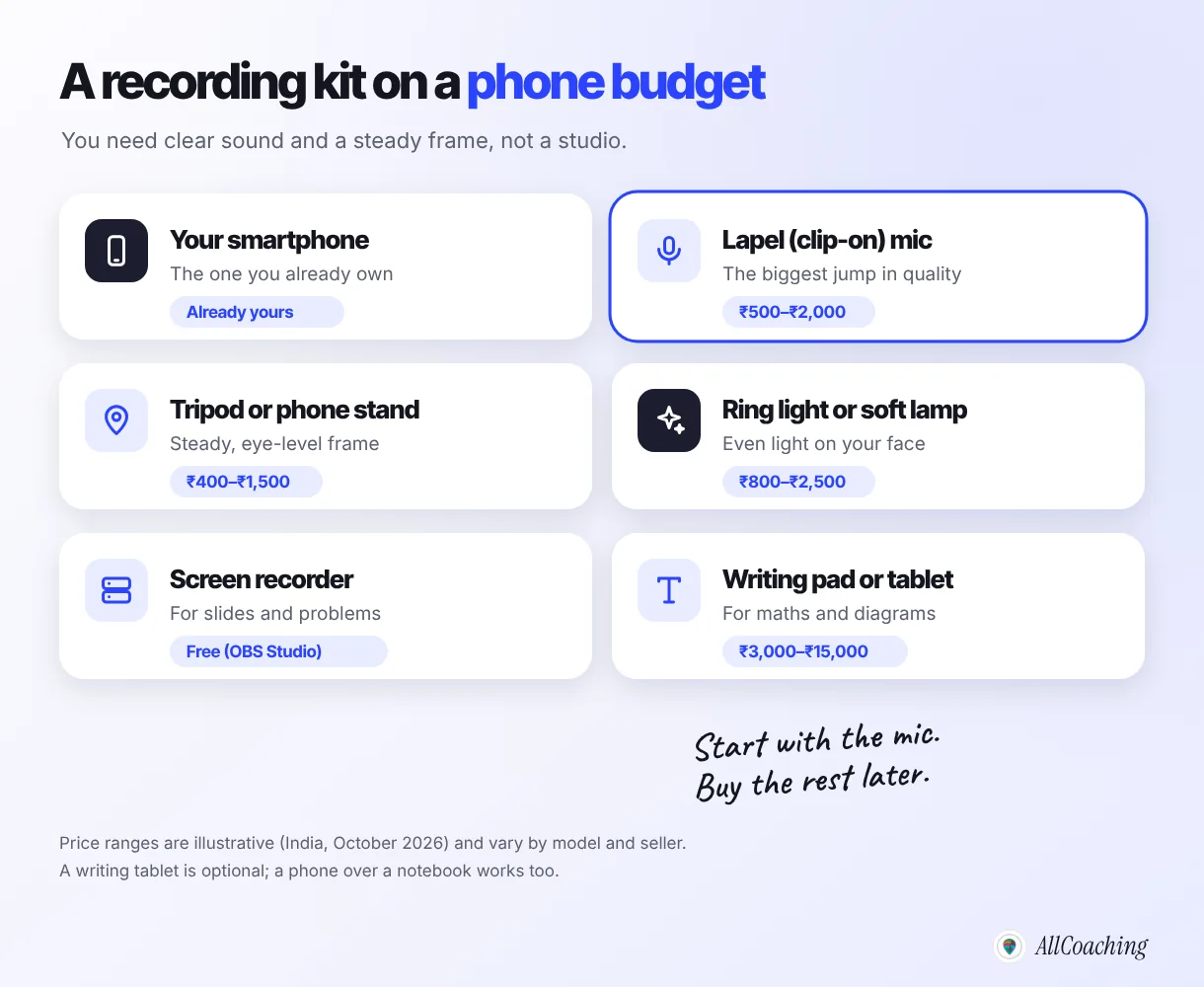
A good budget recording setup is the smartphone you already own, a lapel (clip-on) mic, a tripod or phone stand, soft light facing you, and a free screen recorder for slides or problem-solving. Students forgive an average picture; they do not forgive audio they cannot hear.
Sound first: the lapel mic
A phone's built-in mic picks up the fan, the traffic and the echo of a bare room. A wired or wireless lapel mic clipped 15–20 cm below your chin fixes most of that. Illustratively, these cost ₹500–₹2,000 in India. Record in the quietest room you have; curtains, a bed and a bookshelf absorb echo better than any foam panel.
A steady frame at eye level
Mount the phone on a tripod or stand (illustratively ₹400–₹1,500) at eye level, about an arm and a half away. Record horizontally. YouTube's recommended upload settings note that "the standard aspect ratio for YouTube on a computer is 16:9" and list MP4 as the recommended container,3 which is what a phone in landscape mode already records.
Light facing you
Sit facing a window during the day, or use a ring light or soft lamp (illustratively ₹800–₹2,500) behind the phone. Avoid a window behind you; it turns your face into a silhouette.
Screen recording and a writing surface
Maths, physics and accounts students need to see you solve. Two cheap ways: record your screen while you write on slides or a digital whiteboard, or mount the phone over a notebook and write with a thick pen. OBS Studio describes itself as "free and open source software for video recording and live streaming"4 and works on Windows, Mac and Linux. A pen tablet (illustratively ₹3,000–₹15,000 depending on size) is a later upgrade, not a requirement. For a wider tool list, see our guide to the best free tools for teachers to record lectures.
Do
Buy a mic first. Record a 30-second test and listen on cheap earphones. Turn on airplane mode while recording. Keep the same spot, light and framing for the whole course so lessons look consistent.
Avoid
Buying a camera before you have recorded a single lesson. Recording next to a ceiling fan or an open window. Switching between portrait and landscape across lessons. Using the phone's front camera when the rear one is much sharper.
How do you script and teach on camera?
Script each lesson as a bullet outline, not a word-for-word text: a hook, the one idea, two examples, a practice question and a recap. Then teach to one imagined student, the way you would at your desk.
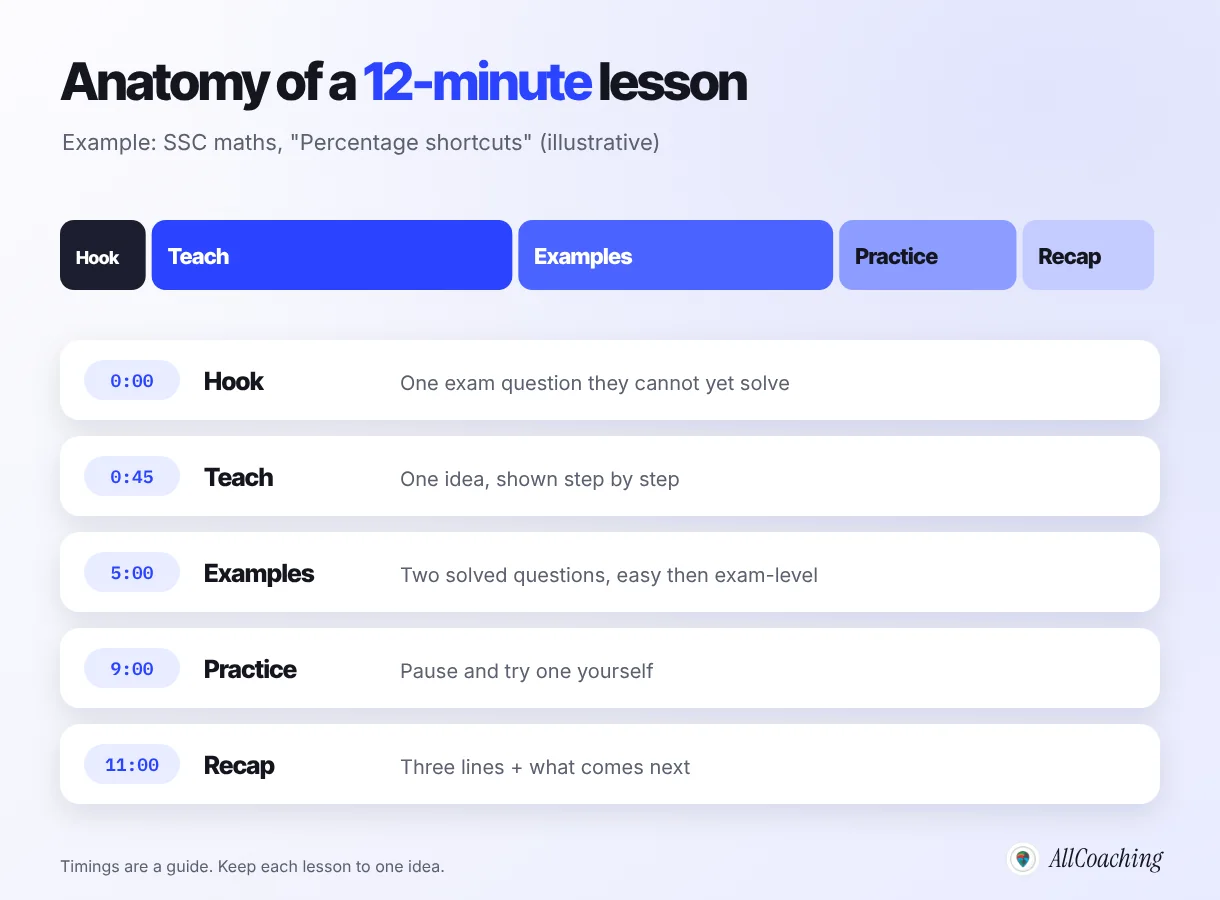
The five-part lesson
- Hook (under a minute): show an exam question or real situation the student cannot handle yet.
- Teach: the one idea, step by step, with the board or slide on screen.
- Examples: two solved examples, an easy one then an exam-level one.
- Practice: "pause the video and try this one", then show the answer.
- Recap: three lines, and what the next lesson covers.
Talking to a lens
Most educators find the first ten recordings awkward and the next ten normal. A few things help: stick a small note with the student's name you are teaching to next to the lens; keep your bullet outline just below the camera; record each lesson in one or two takes and accept small slips; and stand or sit the way you do in class, not stiffly. Students choose a teacher for clarity and warmth, not for a newsreader's polish.
Batch your recording
Record a whole module in one or two sittings: same clothes, same light, same framing. It is faster, and the module looks like one piece. Label files as you go (M2-L04-percentage-shortcuts.mp4) so editing and uploading stay in order.
"The educators whose first courses sell are not the best performers on camera. They are the ones whose lessons are short, in order and clearly explained."
Amit Ratan, Founder & CEO, AllCoachingHow should you edit course videos with free tools?
Edit lightly: trim the start and end, cut long pauses and mistakes, raise the volume if needed, and add a title card. Course students want clarity, not transitions and music.
Free editors are enough for this. Shotcut, for example, describes itself as "a free, open source, cross-platform video editor".5 On a phone, the built-in gallery trimmer handles start and end cuts. If you made a mistake while recording, pause for two seconds, then repeat the sentence; the pause makes the cut easy to find later.
- Keep: trims, cuts of long silences, a simple title card with module and lesson number, on-screen text for formulas or key words.
- Skip: background music under speech, fancy transitions, zoom effects on every sentence, intros longer than five seconds.
- Export: MP4 in landscape at the resolution you recorded. YouTube lists MP4 as its recommended container.3
A useful rule: if a lesson needs more than 15 minutes of editing, re-record it instead. Over-editing is the most common reason a first course takes months instead of weeks.
Should you create an online course in Hindi or a regional language?
Teach in the language your students think in and search in. For many Indian exam and skill students that is Hindi, Hinglish or a regional language, not English, and a course in their medium often feels made for them.
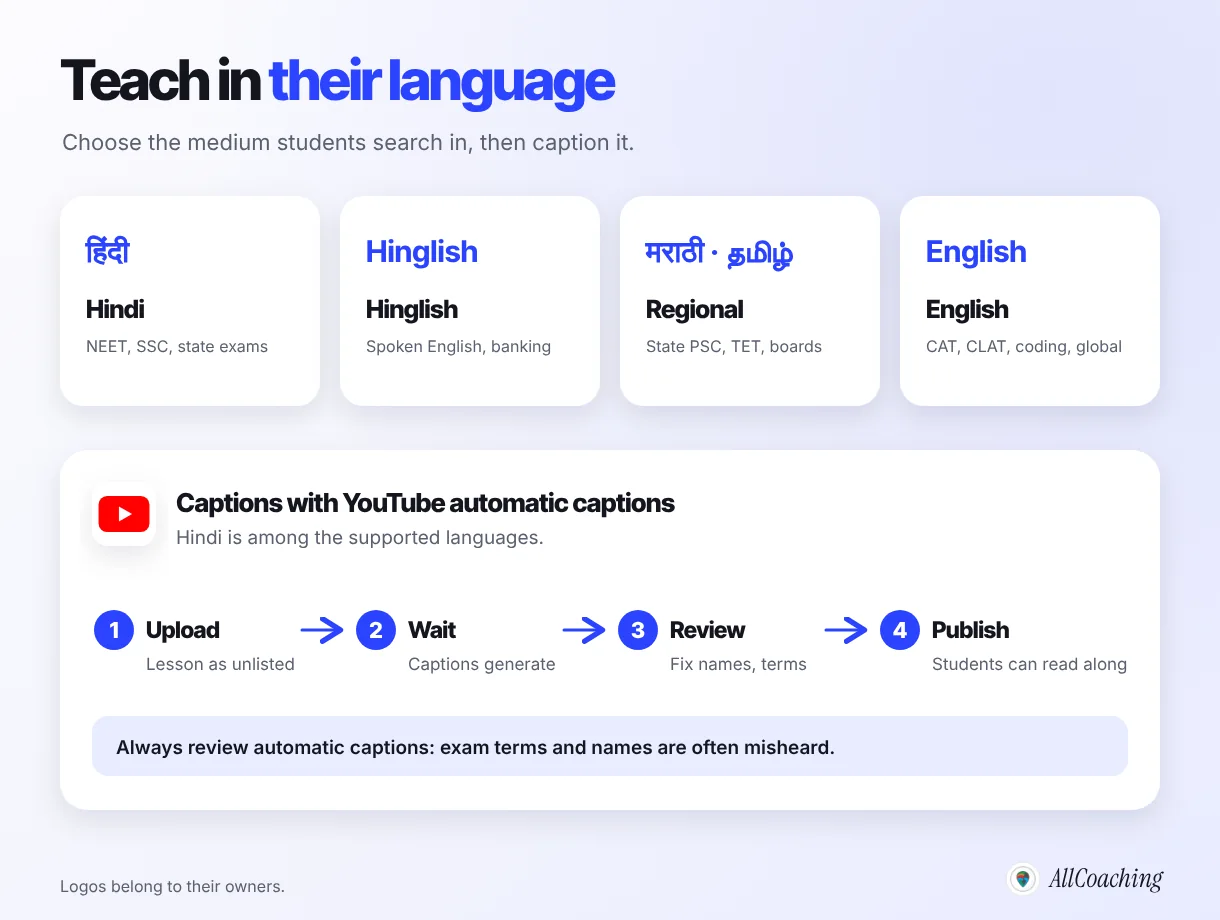
Pick one medium per course
Decide the medium before you record, and say it in the course title: "NEET Biology in Hindi", "SSC Maths in Hinglish", "MPSC Polity in Marathi". Mixing languages lesson by lesson confuses students. If you plan to serve two mediums, record two courses; the outline and PDFs can be shared and translated.
Technical terms
Exam students in Hindi medium still meet English terms in many papers and textbooks. A common approach is to teach in Hindi while writing key terms in both scripts on the board ("कोशिका / cell") and keeping a bilingual glossary in the module PDF.
Captions
Captions help students in noisy hostels, students with hearing loss and students revising quickly. YouTube creates automatic captions using speech recognition, and Hindi is among its supported languages. Its help page is clear about the limits:2
"Always review automatic captions and edit any parts that haven't been properly transcribed."
YouTube Help, "Use automatic captioning"In practice, review the names, formulas and subject terms first; those are what automatic captions get wrong most. Captions are a YouTube feature, so check how they appear in your academy's player during your pilot.
Why does every online course need a free demo lesson?
A free demo lesson lets students judge your teaching before they pay, and it is usually the single most persuasive thing on your course page. Make lesson 1 free and make it genuinely useful.
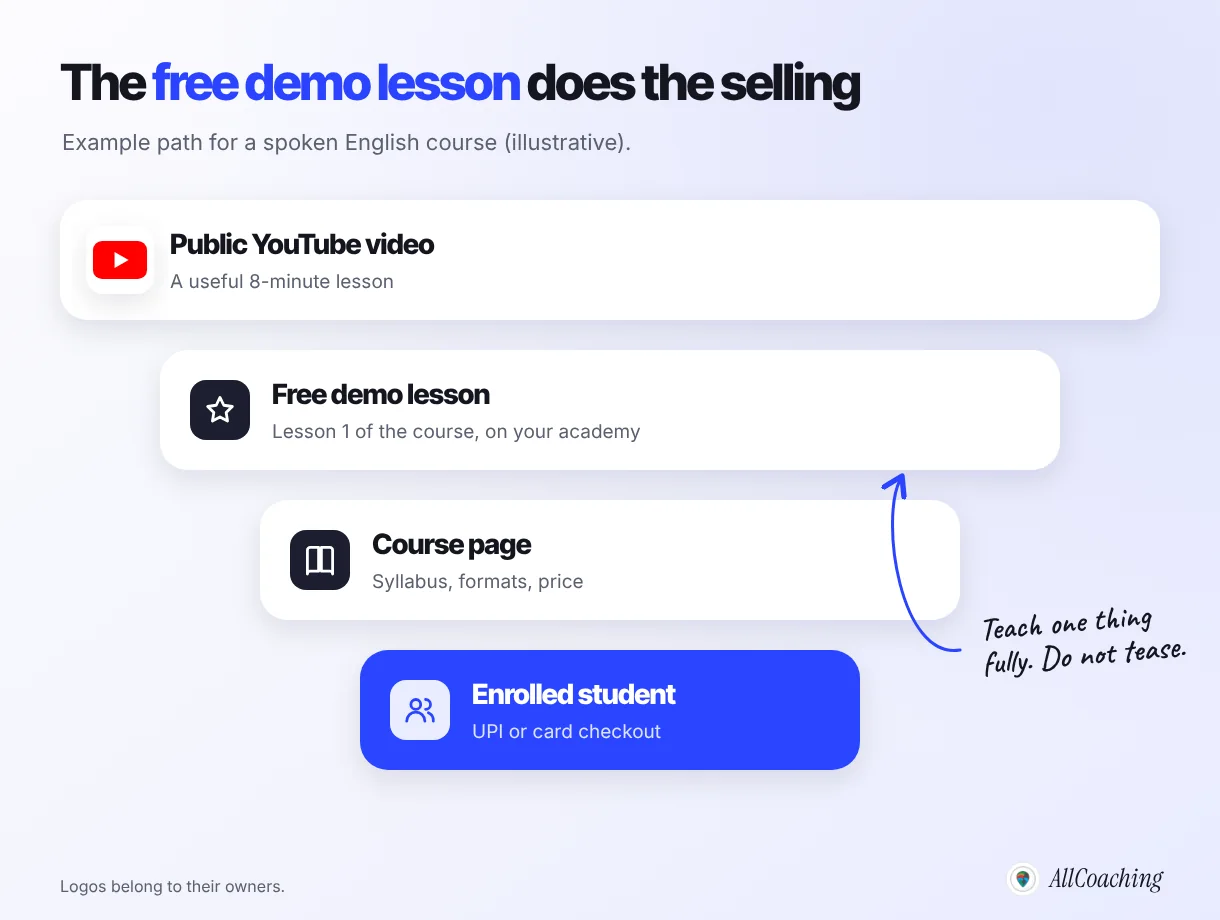
- Teach one thing fully. A demo that only lists what the course covers sells nothing. A demo that solves a real problem sells the next lesson.
- Keep it 10–15 minutes, recorded with the same kit and style as the rest of the course, so the student knows exactly what they are buying.
- End with the path: what the full course covers, how long it takes, and where to enrol.
Your public YouTube videos do the same job one step earlier. A useful free lesson on your channel brings a student to your academy; the demo lesson there turns that interest into a decision. When you are ready to promote the course, our guide on how to sell courses online in India picks up from here.
How do you upload and organise your course in your academy?
Create the course, add lessons in syllabus order module by module, attach each module's PDF and test, mark lesson 1 as free, write the description from your outcome sentence, and keep the course in draft until the pilot is done.
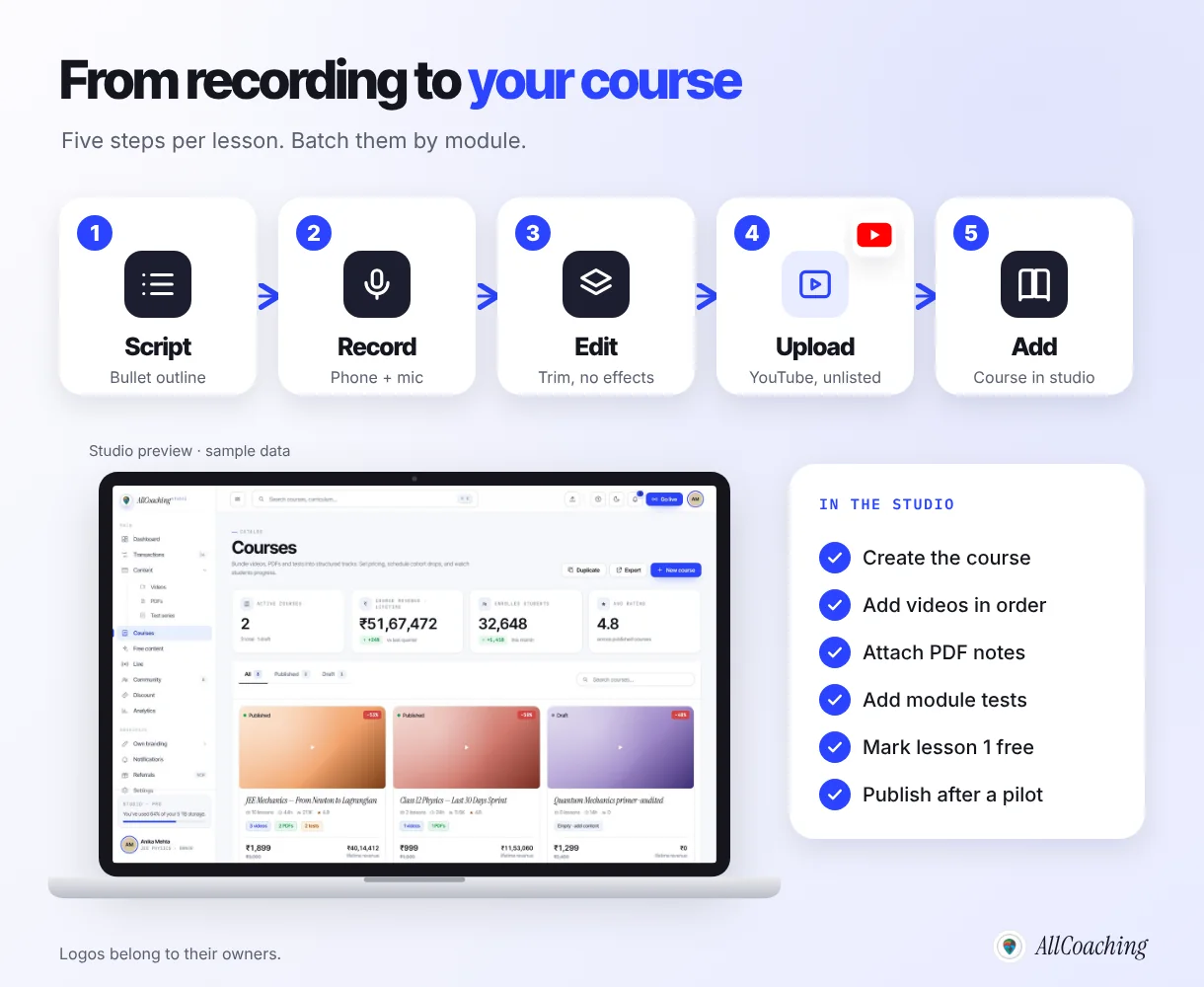
Name things the way students search
Use titles students would type: "SSC CGL Maths in Hindi: Arithmetic Complete Course", not "Batch 7 Recorded". Number lessons consistently (Module 2 · Lesson 4 · Percentage shortcuts) so the list reads like a syllabus.
Write the description from the outcome
The first line is your outcome sentence. Then list what is inside: number of modules, lessons, PDFs and tests, the live class schedule, the language, and who it is for and not for. That is the information students compare.
On AllCoaching
In the AllCoaching studio, the Content section holds your videos, PDFs and test series, and a course bundles them in the order you choose. Videos come in through YouTube, so you upload once to YouTube and add the lesson to the course. Students buy through UPI or card checkout, access opens automatically, and payouts reach your bank through Razorpay. The course lives on your own academy website and your own Android app on every plan, with the iOS app on Pro and Scale. If you have not decided where your academy will live yet, our explainer on what an online academy is covers the options.
Build your own academy. Try it free for 14 days.
Website on your own domain, your own Android app (iOS app on Pro and Scale), unlimited live classes and UPI checkout on every plan. Plans from ₹6,999 a year after the trial (excl. GST).
No card needed · Cancel anytime in the trial · Your data stays exportableHow do you test an online course with 5–10 students before launch?
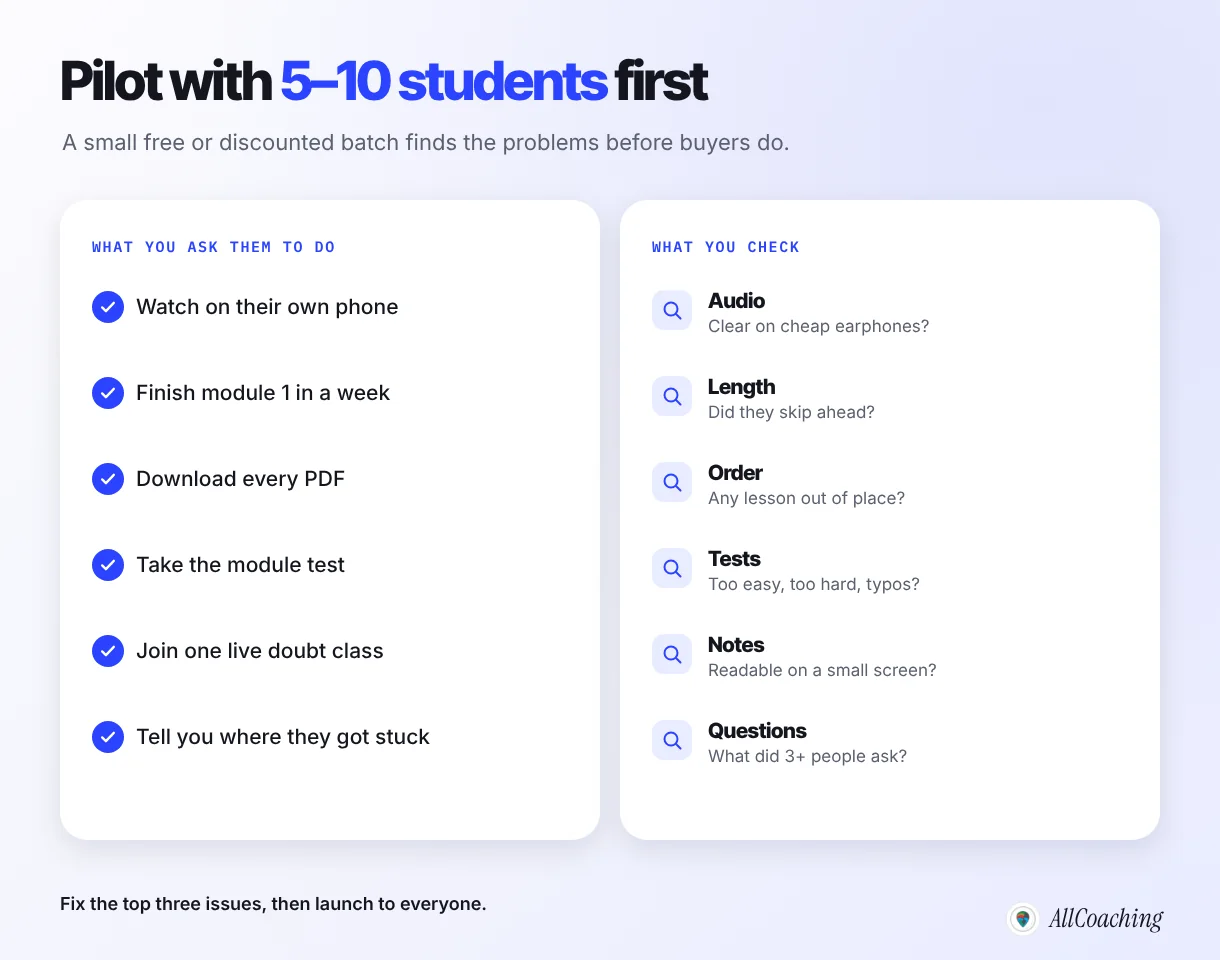
Give the course free or at a discount to 5–10 students from your current batch or audience, ask them to finish module 1 within a week on their own phones, and fix the top three problems they report before you open it to everyone.
Who to pick
Choose a mix: two strong students, two average ones, one or two who struggle, and at least one who uses a basic Android phone on mobile data. If you teach a skill, include someone who has never tried it. Their confusion is your most useful data.
What to ask
- Where did you stop watching, and why?
- Which lesson needed a second watch?
- Was the audio clear on your earphones?
- Was any test question unclear or wrong?
- What did you search for that was not in the course?
Collect the answers in one sheet and count. If three students ask the same question, it becomes a new lesson or a line in the PDF. If two students stopped at the same lesson, that lesson is too long or out of order.
Pilot students also give you your first honest feedback to quote on the course page, with their permission and in their own words. Never add results or ranks you cannot prove.
How often should you update an online course?
Review the course after every batch and before every exam cycle: re-record lessons that confuse students, update PDFs and tests when the syllabus or pattern changes, and add lessons for questions that keep coming up in live classes. Short lessons make this cheap; you replace one 10-minute video, not a 90-minute lecture.
- After each batch: read the doubt-class questions and test results; fix the weakest three lessons.
- When an exam notification changes the pattern: update the outline, tests and the course description first, then the affected lessons.
- Every year: refresh the demo lesson and the course title year so students know it is current.
Keep a simple change log at the top of the course description ("Updated October 2026: new mock tests for the revised pattern"). Students trust a course that visibly stays current, and you avoid the trap of a second "2027 edition" that splits your students across two versions.
Common mistakes when you create your first online course
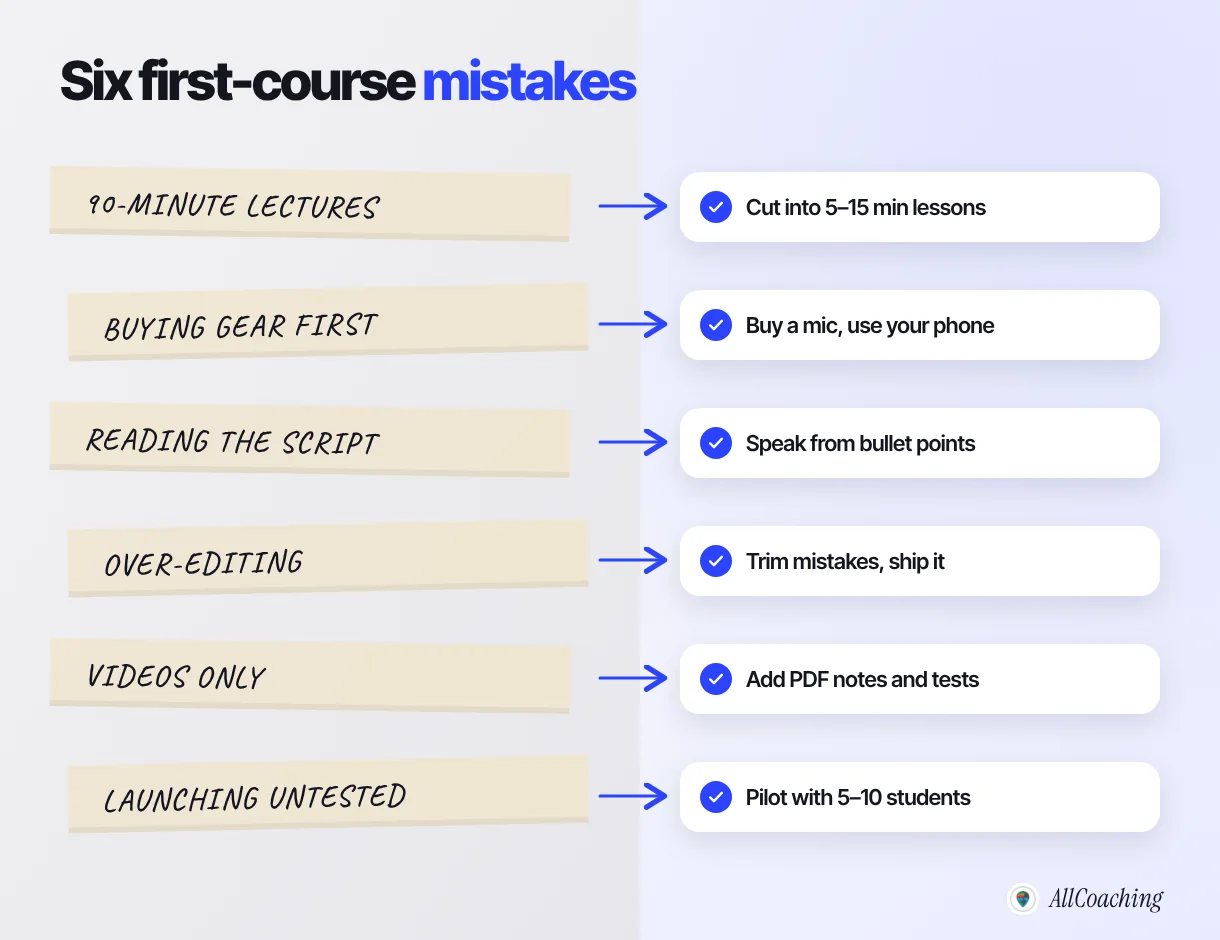
The most common first-course mistakes are recording full-length classroom lectures, buying equipment before recording anything, reading a script, over-editing, shipping videos without notes or tests, and launching without a pilot. Each has a simple fix.
One more that is easy to miss: keeping everything in WhatsApp groups and Drive links. It works for one batch, then breaks when you have three batches, two price points and students asking who has access to what. Putting the course in one place, with its own checkout, is what lets it run while you teach the next batch.
Glossary
- Course outcome
- One sentence describing what a student will be able to do after finishing the course, and in how long.
- Module
- A group of related lessons inside a course, usually one unit or chapter of the syllabus, ending with notes and a test.
- Micro-lesson
- A short video lesson of about 5–15 minutes that teaches one idea.
- Lapel mic
- A small clip-on microphone worn on the shirt, close to the mouth, that records clearer voice than a phone's built-in mic.
- Screen recording
- A video capture of your computer or tablet screen, used to teach with slides, a digital whiteboard or software.
- Unlisted video
- A YouTube video that anyone with the link can watch but that does not appear in YouTube search or on your channel's Videos tab.
- Automatic captions
- Subtitles that YouTube generates from a video's speech using speech recognition, which the educator should review and correct.
- Demo lesson
- One complete lesson offered free so students can judge your teaching before they buy the course.
- Pilot batch
- A small group of 5–10 students who take a new course before launch so the educator can find and fix problems.
Frequently asked questions
How do I create an online course in India?
Choose one outcome for one group of students, split the syllabus into modules of 5–15 minute lessons, record them on a phone with a lapel mic, add PDF notes and a test to each module, offer a free demo lesson, upload everything to your academy and pilot it with 5–10 students before launch.
How do I make an online course on my phone?
Mount the phone on a tripod in landscape at eye level, clip a lapel mic below your chin, sit facing soft light, and record one short lesson at a time. Trim the start and end in a free editor or the phone's gallery, export MP4 and upload it.
Can I create an online course in Hindi?
Yes. Choose Hindi as the medium for the whole course, say so in the title, write key technical terms in both scripts, and use YouTube automatic captions, which support Hindi, after reviewing them for errors in names and subject terms.
What equipment do I need to record an online course in India?
A smartphone you already own, a lapel mic, a tripod or phone stand, and soft light facing you. Illustratively a lapel mic costs ₹500–₹2,000 and a stand ₹400–₹1,500 in India. A free screen recorder such as OBS Studio covers slides and problem-solving.
How long should online course videos be?
Most lessons work best at 5–15 minutes with one idea each. Short lessons are easier to watch on a phone, easier to find when revising and easier to re-record when the syllabus changes.
What is a good structure for an online course?
Four to eight modules that follow the syllabus or a learning order, each made of short video lessons, one PDF of notes and a module test, with full mock tests or a final project at the end and lesson 1 free as a demo.
Where should I host my course videos?
Many Indian educators upload lessons to YouTube as unlisted videos, which only people with the link can watch, and add them to a paid course in their academy. On AllCoaching, videos via YouTube are unlimited on every plan.
Should I test my course before launching it?
Yes. Give it to 5–10 students free or at a discount, ask them to finish module 1 in a week on their own phones, and fix the top three problems they report before you open it to everyone.
How much does it cost to create and sell an online course in India?
Recording can start with a phone you own plus a mic. To sell it from your own academy on AllCoaching, there is a 14-day free trial with no card, then plans of ₹6,999, ₹12,999 or ₹24,999 a year with a 10%, 7.5% or 5% platform fee, or ₹99,999 a year with 0%, all excluding GST.
Sources
- YouTube Help, "Change video privacy settings" (unlisted videos), support.google.com, checked October 2026.
- YouTube Help, "Use automatic captioning" (supported languages and review), support.google.com, checked October 2026.
- YouTube Help, "YouTube recommended upload encoding settings", support.google.com, checked October 2026.
- OBS Studio, official website, obsproject.com, checked October 2026.
- Shotcut, official website, shotcut.org, checked October 2026.
- AllCoaching pricing, allcoaching.in/pricing, October 2026.
Amit builds AllCoaching, the academy platform Indian educators set up themselves: their own website on their own domain, their own app, and the tools to grow it. This guide comes from watching educators build their first courses with us; outside facts are linked to their official sources, and device prices and example structures are marked as illustrative.